
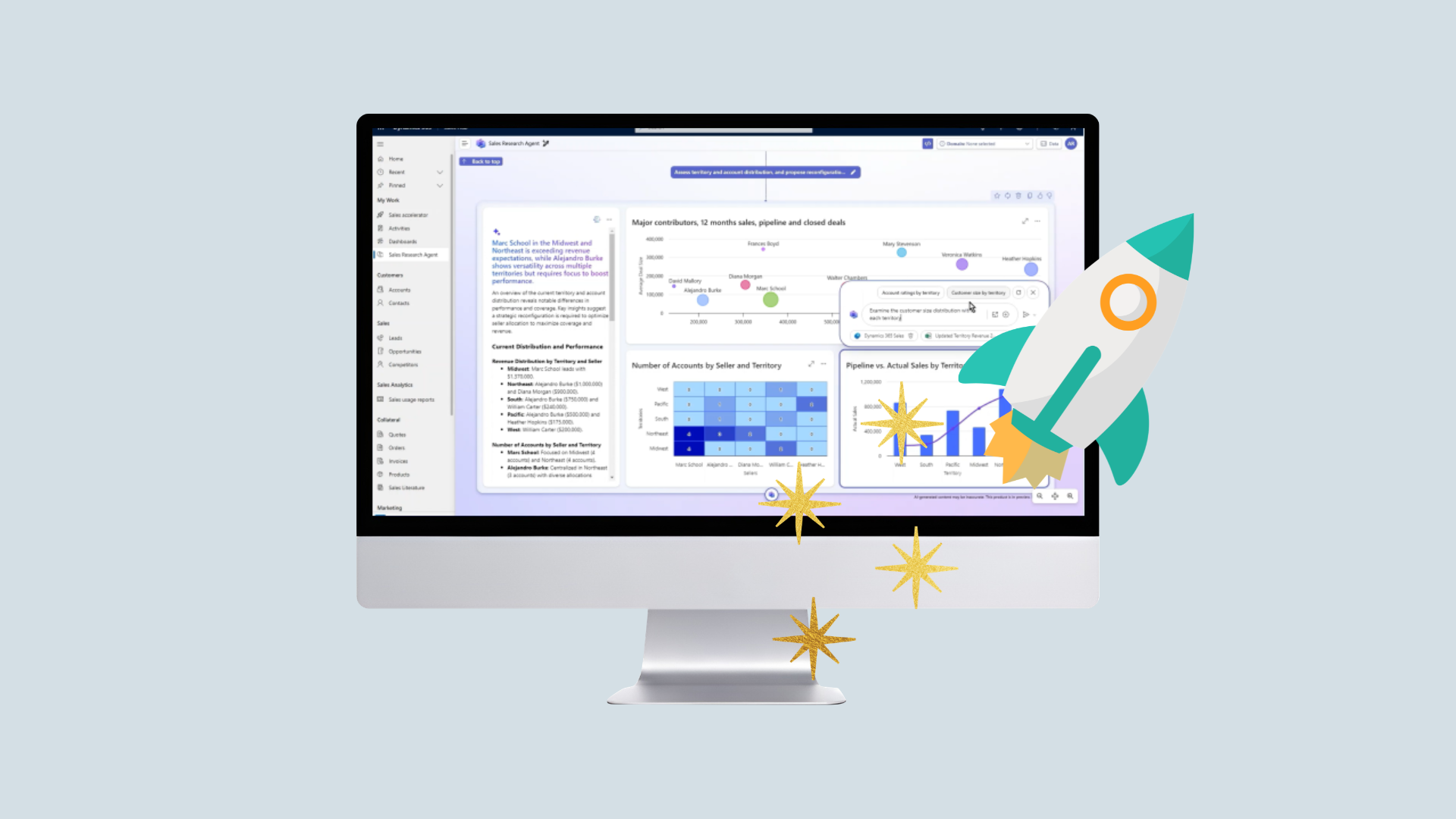
Microsoft Dynamics 365 Release Wave 1 2026 – AI innovations that enhance CRM for banking and finance
Microsoft Dynamics 365 Release Wave 1 2026 – AI Innovations That Enhance CRM for Banking and Finance
Customer relationships in banking and finance require both a physical presence and traceability—the right background information for every customer meeting, up-to-date data, and processes that keep things running smoothly in a regulated environment. Release Wave 1 2026 for Dynamics 365 (starting in April) targets precisely these areas with AI built right into the workspace. Here are some of the new features we believe will make the biggest difference in banking and finance:
- Talk to your CRM data: Ask questions in plain language to an AI agent within the CRM system and get analysis, summaries, and recommended next steps
- Next Best Action that prioritizes the right customer action with justification
- Hierarchy Control to visually view complex customer structures and relationships
- Sales Hub Dialer with transcription, summarization, and post-call actions (no need to enter all your notes manually)
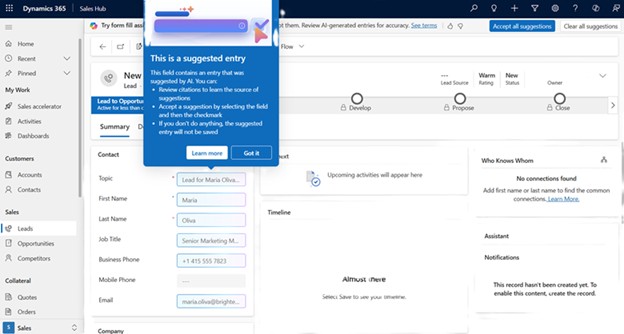
- Automatic CRM updates: AI suggests/fills in fields from emails and meetings, or from pasted text (e.g., emails/documents)
- Quality Evaluation Agent for quality assurance and compliance in customer service
- Restore deleted items from the Recycle Bin (up to 30 days)
Quality Assurance and Compliance in Customer Service
The Quality Evaluation Agent is particularly relevant for organizations that are subject to supervision by the Swedish Financial Supervisory Authority or are covered by regulations such as MiFID II, IDD, or AML requirements.
Quality Evaluation Agent automatically compares the agent’s response against your knowledge bases and process descriptions to verify that the correct procedures have been followed.
What is particularly interesting is the ability to mark specific review points as critical, where an incorrect answer automatically fails the interaction. Furthermore, these can be handled either as quality issues or as pure compliance checks, making it easy to distinguish between what constitutes an opportunity for improvement and what constitutes a violation. This provides you with a structured and documented way to ensure that, for example, advisory or complaint handling policies are always followed.
Ask questions and get a complete overview of your business with Sales Research Agent
For sales managers who need to keep track of the pipeline, follow up with their team, and report on progress, it often takes a lot of work to gather data from various sources before anyone can even begin to analyze it. The new Sales Research Agent is an analytical AI agent that lets you ask questions about your customers and deals in plain language and presents the answers graphically in an interactive dashboard-like view. What sets it apart from a standard reporting tool with graphs is that the agent not only displays data but also analyzes it and explains how it arrived at those conclusions. For an account manager or sales manager who needs to understand why the pipeline looks the way it does—not just what it looks like—this is a crucial difference.
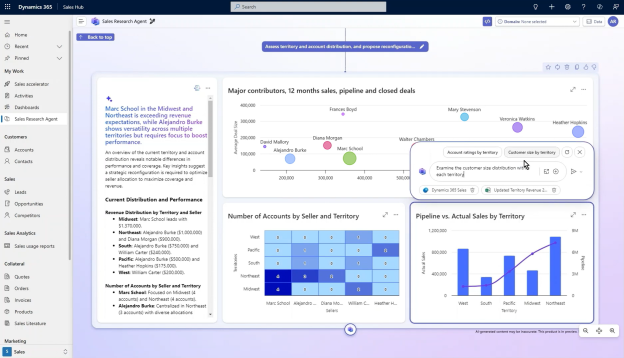
The agent can retrieve information from multiple data sources, and you can “dig deeper” into specific sections directly within the view if you want to understand more by asking the agent follow-up questions. It is not a static document but a dynamic resource that you can interact with and that you can save and update on an ongoing basis. In addition, you can define your own business functions using your specific terminology and industry context, which means the agent can be customized to actually understand how you specifically talk about your customers and business, not just generic concepts.
Qualify the right business leads
Salespeople and consultants often have a list of potential customers they never quite get around to following up on. Not because they aren’t interesting, but because it takes time to familiarize themselves with each case and determine the right next step. That’s exactly the kind of work that Sales Qualification Agent is designed to handle.
The agent analyzes your leads, evaluates them, and suggests what you should do next, including draft personalized outreach emails tailored to each specific lead. You can run it in “Research Mode,” where it simply analyzes and presents the data, or in “Research & Engage Mode,” where it actually sends the emails for you.
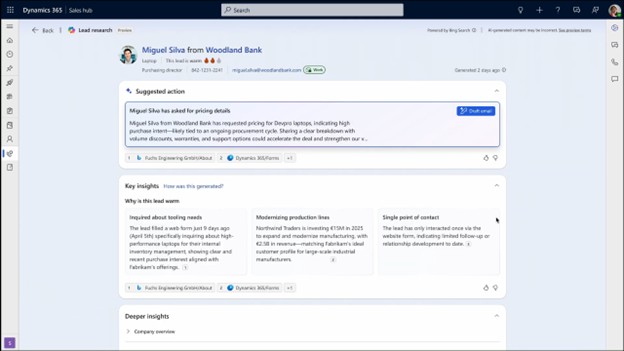
For companies where the tone and content of customer communications need to be carefully considered, there are plenty of options for configuring how agents respond and reviewing outgoing emails before enabling Engage mode. It’s a feature you can roll out at your own pace.
Sales Close Agent – let AI summarize and prepare you for every meeting and call right within the active sales opportunity
Another new feature is Sales Close Agent. An AI agent that operates directly within a sales opportunity in the CRM and will be expanded with additional features over the next six months.
Starting in April, Research Mode will be available, giving you a complete picture of a deal in seconds. Are you preparing for a meeting with a client you haven’t seen in six months? Instead of manually going through email history, meeting notes, and CRM fields, you’ll get a comprehensive overview right away.
Later this year, the agent will be expanded to include Ask & Refine, which makes the agent interactive. You can ask questions directly within the business opportunity, request help with meeting preparations, risk assessments, and next steps. It’s like having an analytical colleague who knows every detail of the deal just as well as you do.
It is not a tool designed to replace your judgment, but rather to help you make it more quickly.
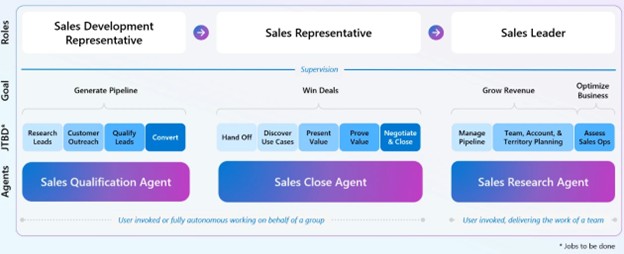
What makes the three agents Sales Qualification Agent, Sales Close Agent and Sales Research Agent are particularly powerful because they cover the entire sales cycle in a seamless workflow. From qualifying a potential customer, through the negotiation process and closing deals, to the overall pipeline view that the sales manager needs to allocate resources and monitor the team. In an industry where customer relationships are long and complex, and where each deal often involves multiple decision-makers and products, having AI support throughout the entire chain rather than at isolated points makes a significant difference.
- Data & Security: Information managed in your CRM (including prompts and responses associated with your environment) is processed within your tenant/CRM environment and is subject to the same access controls and security measures (e.g., roles/access, logging, and encryption) as other CRM data. Your customer data is not used to train the provider’s general AI–models. (Note: If you connect the AI to third-party services/connectors, data may be shared according to the configuration you choose.)
- Usage & Cost: The AI/agent features listed above are usage-based. You pay either via a monthly package/capacity (e.g., a certain number of messages/“credits”) or via Pay‑as‑you‑go where the cost is based on actual usage.
- This is particularly important for organizations that handle sensitive personal data and financial information and are subject to the GDPR as well as national regulatory requirements.
Get help prioritizing and figuring out what to do next with “Next Best Action”
The more AI agents and signals you have access to, the harder it becomes to know what you should actually prioritize. Next Best Action solves this problem by gathering actions from the Sales Qualification Agent, Sales Close Agent, and any of your own agents or workflows, and then ranking them to highlight the most time-critical and business-impacting action right now. Each recommendation comes with a clear justification so you understand why it’s prioritized, making it easier to act with confidence rather than guesswork.
For an advisor managing a broad portfolio of clients and deals—where there’s always something that can be done but rarely enough time to do it all—this is the difference between a system that gives you more to look at and one that actually helps you decide what needs your attention today. If you also have your own agents or custom workflows, you can integrate them as well, so that Next Best Action serves as a common prioritization hub for all actions—not just those coming from Microsoft’s own AI agents.

Get a complete overview of the customer relationship
Have you ever tried to explain to a colleague the organizational structure of a major client? Which companies are involved, who makes what decisions, and where you have active business relationships? These are the kinds of questions that Hierarchy Control is designed to answer easily.
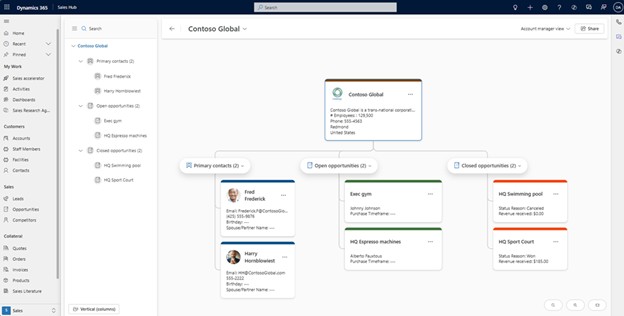
The view is customizable and can display complex customer relationships graphically, much like an organizational chart, and in the new version, you can combine different types of records in the same view—for example, companies, contacts, and opportunities. You can immediately see where you have ongoing deals, who the decision-makers are, and how the relationships are connected. You can also edit records directly in the view without navigating away. It’s a simple change on the surface, but it makes a big difference when you need to get your bearings quickly.
Call integration directly in Dynamics 365
You need to call a customer, look up the number in the CRM, make the call from your phone, finish the conversation, and then sit there trying to remember what was said while you manually enter notes. With Sales Hub Dialer , that manual step disappears.
Sales Hub Dialer is a fully integrated telephony solution that lets you make calls directly from a customer or contact card in Dynamics 365 Sales. If a customer calls you, their information automatically appears on the screen before you even answer. We can enable AI live transcription and sentiment analysis in the background, so that after you end a call, you receive an automatic summary with action items already filled in.
Requires a separate calling service, such as Microsoft Teams Calling Plan, which can replace traditional PBX systems at competitive prices.
No need to enter data manually
Keeping CRM data up to date is something everyone knows is important, especially if we want to make full use of our data through other AI agents. Two new features address data quality in slightly different ways.
Data Enrichment Agent lets AI analyze email conversations and meeting recordings linked to a sales opportunity and then suggests updates to relevant fields based on what was actually said and written. You can choose to have this happen automatically or review the suggestions manually, which is useful in an environment where data quality and traceability are important.
Smart Paste is simpler but just as useful: paste any text from the clipboard. It could be, for example, an email, a business card, or an excerpt from a document, and Copilot interprets the content and fills in the correct fields on the form for you.
Did you accidentally delete something? Now you can undo it
It happens. An automated process deletes the wrong records, or someone clicks the wrong button and deletes a record. Until now, this has often meant time-consuming recovery work—or, in the worst case, permanent data loss.
Starting now, administrators can restore deleted records from the Recycle Bin for up to 30 days. For an organization with high data integrity requirements, this is an important addition.
Why is this particularly relevant right now for the banking and finance sector?
Banks and financial institutions operate in an environment where regulatory requirements are increasing, margins are under pressure, and customer expectations regarding accessibility and personalized service continue to rise. At the same time, documentation requirements, traceability, and internal controls are central to their operations.
In this context, AI in CRM is not about replacing people—but about reducing administrative burdens, strengthening the basis for decision-making, and ensuring that the right information is available at the right time. Release Wave 1 2026 is a step in that direction.
Ready for the next step?
What sets this release wave apart from previous ones is that AI features are now built into the daily workflow. Meeting preparations, follow-ups, data entry. Tasks that still need to be done, but can now be performed with AI support. For those of you working in banking or finance, where customer relationships and accurate information are business-critical, this is a competitive edge worth capitalizing on now.
Would you like to learn more about how to make the most of these features, or what you need to get started? Get in touch with us, and we’d be happy to tell you more.
No results match the selected filters.

6 Common Problems We See in Customer Service—and How Dynamics 365 and AI Can Solve Them!
Read more

Customer service is shifting from menu-driven options in phone queues to "natural" conversations with AI
Read more
Modernizing Banking Onboarding in Dynamics 365 CE with Embedded Canvas Apps
Read more
Contact us today
Email us at info@releye.se