

What's New in Dynamics 365 Customer Service from Microsoft Release Wave 1, 2025
Microsoft Release Wave 1, 2025 focuses on enhancing the customer service agent experience and boosting productivity through Copilot functionality. With Copilot and AI, customer service agents receive support to quickly find the resources needed to resolve issues, handle cases more efficiently, and automate time-consuming tasks.
With efficiency and automation in mind, we are now launching a range of new autonomous agents designed to simplify and streamline key work processes. These agents are designed to support employees in their daily work—so they can devote more time to creating value for customers seeking help and support.
Our business consultant, Emmie Dejin, explains how these updates might affect your business—and how you can take advantage of the new features.
The new agents are:
- Customer Intent Agent: enables the extraction of customer intent directly from conversations, paving the way for more advanced self-service solutions. The agent can independently interpret the reason why the customer is reaching out—without the need for manual interpretation. This makes it easier for the customer to receive the right kind of assistance right from the start.
- Customer Knowledge Management Agent: collects information from closed cases and uses it to create new knowledge articles or update existing ones.
- Case Management Agent: automates tasks throughout the entire case process. The agent creates new cases from conversations with chatbots, escalates them to case managers, updates cases based on content from conversations, emails, and notes, and generates automatic follow-ups for cases.
Understand the customer's goals and challenges
Customer Intent Agent helps you better understand why customers contact customer service. By identifying and extracting customer intent directly from incoming cases, a self-learning loop is created, leading to continuous improvements in both service and self-service solutions.
With the help of the agent, common customer issues can be identified, along with the solutions that have proven to be most effective. This information is organized into a knowledge base, which makes it easier for the CRM system to understand and handle customer inquiries more effectively over time.
One specific use case is in chatbot solutions. There, the bot can use the agent’s insights to guide customers through troubleshooting, ask relevant follow-up questions, and handle simpler cases automatically. When human contact is needed, the agent can simultaneously support customer service representatives by highlighting relevant information, thereby reducing handling time. The feature also reduces the risk of cases being routed incorrectly by quickly determining what the customer actually needs help with.
Keep knowledge base articles updated automatically
Customer Knowledge Management Agent enables you to automatically create new knowledge articles based on content from case notes, emails, chats, and calls. This makes it easier to keep the knowledge base up to date and relevant.
When a case is closed, the agent analyzes the content and creates a new article if there are any knowledge gaps. The agent compares the case information with existing articles to determine whether a new article is needed or if an existing article should be updated.
Automation reduces the manual workload and speeds up the process of creating and approving new items. In addition, the knowledge gathered can be used to improve chatbots, paving the way for self-service solutions and more efficient handling of future cases.
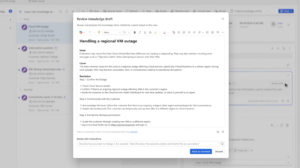
When a case is closed, the agent generates a draft knowledge base article, which the customer service representative can choose to edit or forward for review.
Keep your tasks automatically updated
The Case Management Agent automates the handling of case details from both live chats and incoming emails. This saves time for customer service representatives and reduces the time otherwise spent on follow-up work.
When a case is created from a live chat or an email, the agent automatically fills in the necessary information and updates the fields as the conversation progresses. The agent provides suggestions for following up on cases awaiting a response, which reduces the risk of cases being left unresolved and missed.
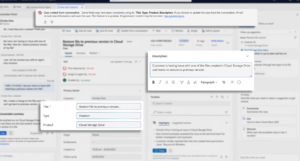
The agent suggests the next steps for the case if there is anything that needs to be followed up on, briefly summarizes the case in the timeline to provide a quick overview, and automatically updates fields based on notes, chats, and emails.
Together, these AI-powered agents create a smarter, more automated, and proactive customer service experience that saves time, improves service quality, and ensures customers receive assistance more quickly. This frees up time for customer service representatives to focus on more complex issues that require manual intervention.
More news in the Customer Service Workspace app
In addition to the autonomous agents, several updates are being released to enhance the user experience in the Customer Service Workspace app. The app now features a modernized interface with a new design, larger message fields, and strategically placed icons. The inbox has also been updated with a new, rounded, and more contemporary look.
Another key improvement is the ability to automatically restore sessions after a browser update. Previously, users had to manually reopen all sessions—a time-consuming process. Now, all tabs and sessions are restored automatically, allowing work to continue without interruption.
Copilot in the email composition window
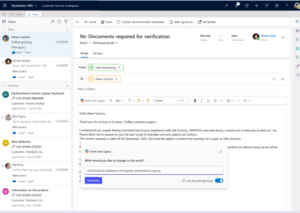
The feature for generating emails via Copilot was previously located in the sidebar, but is now fully integrated into the email editor itself. The latest update also makes it possible to generate and edit individual sections of an existing email draft.
Copilot asks what you want to change, and you can easily type in a prompt to add specific points, actions, or new information—right in the email. This makes it easier to customize the content without having to start from scratch.
Improve response quality by understanding the customer's perspective in emails
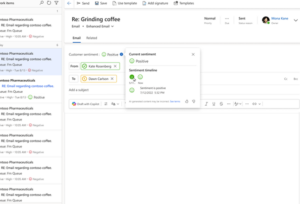
The feature that analyzes customer sentiment in emails allows customer service representatives to quickly gauge the tone of incoming messages. This helps identify issues that are at risk of escalating, so they can be prioritized and addressed in a timely manner.
By tailoring the tone and content of responses to the customer’s mood, both the quality of service and the overall customer experience are improved.
Would you like to learn more about Copilot in Dynamics 365 or autonomous agents for Customer Service? Feel free to reach out to Emmie Dejin—she’d be happy to tell you more!

Emmie Dejin
Business Consultant at Releye
Contact us today
Email us at info@releye.se