

Customer service solutions on the Microsoft platform – which one should I choose?
Over the course of the year, the older Microsoft Dynamics Customer Service application will be phased out. In this article, we’ll explain what the replacement entails, who it’s suitable for, and when you might instead want to consider Dynamics 365 Contact Center.
Customer Service Workspace, the app that was launched a few years ago, is now called Copilot Service Workspace. It is an interface for customer service representatives that allows them to handle different types of customer cases simultaneously. On the other side of the spectrum of customer service solutions, we have Contact Center, a multichannel platform that aggregates sources for phone, chat, SMS, and social media—but it does not create customer cases. In many cases, the Customer Service app and Contact Center are used together (via the Customer Service Premium package) to create a seamless workflow—but it is possible to use them separately.
The Contact Center can be used without the Customer Service app by integrating with external CRM systems such as Salesforce or ServiceNow. In this case, communication takes place on Microsoft’s platform, while case management is handled in the external system. Conversely, Customer Service Workspace can be used without Contact Center if you only need a user-friendly interface to manage cases in Dynamics. If you already have the Customer Service app, you can add contact center functionality
Why is a customer service system needed?
A cluttered inbox and different systems for different communication channels. It’s hard to maintain consistency in every customer interaction when the tools aren’t integrated.
At the same time, customer expectations have changed. They want quick, seamless responses—regardless of the channel. This places greater demands on the customer service team and increases the need to manage multiple channels and processes simultaneously, often by a core group within support and service. Simply sitting at your inbox is no longer enough. Companies need to be visible and available wherever the customer is.
What does Microsoft's updated Customer Service app entail?
It is designed to streamline case management by consolidating emails (which are automatically imported from Outlook) and web interactions into a single workspace. This allows customer service representatives to handle multiple cases simultaneously in tabs without losing context.
- Multitasking: Answer questions via chat while following up on cases via email.
- AI Support: Get recommended responses based on customer history, automatic summaries of cases to reduce administrative work, and suggested knowledge articles and solutions based on previous cases.
- Fast and easy to use: A streamlined experience for customer service representatives, perfect for businesses that rely on email and chat.
- Flexibility: No built-in telephony, but can be integrated with third-party solutions such as Teams or other PBX systems.
Best suited for:
- Companies that handle simple matters via email and the web.
- Organizations that want a fast and efficient workspace without complex omnichannel features.
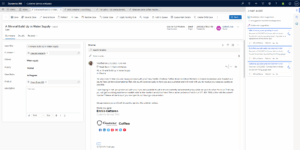
How has the customer service app improved this year?
Microsoft has introduced a new agent model in the Customer Service app, where roles and permissions can be customized as needed. This results in more efficient case distribution, a clearer escalation process, and a more intuitive interface that simplifies workflows.
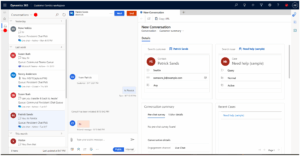
In the past, agents had to open multiple windows to find customer history, previous conversations, and case details. Now, everything is consolidated into a single view, where customer service representatives can see all interactions, recommended actions, and relevant customer data in the same window. Imagine a split screen: the left side displays customer information, and the right side shows the current case with AI-generated recommendations for action.
The new interface also improves collaboration. If a support team member needs help, they can easily escalate the issue to a colleague or expert without switching systems or manually copying information. Microsoft Teams is integrated, allowing employees to quickly bring in the right expertise when needed.
Here’s a concrete example: If a customer has a technical question that requires specialist knowledge, the agent can now click the “escalate” button. The case is then immediately assigned to a specialist along with all relevant information, without the need to summarize the case and forward it via email.
Which Microsoft customer management system is right for which organization?
For organizations with an existing case management system, such as Zendesk or Salesforce, Contact Center can be used as a standalone omnichannel solution. This enables the management of multiple communication channels—such as phone, chat, SMS, and social media—without replacing the existing CRM system. This may be relevant in situations where your organization is satisfied with its existing case management workflow but wishes to supplement it with a modern contact center platform.
For organizations already using the Dynamics Customer Service app, however, there is a more integrated solution. By using the Customer Service Premium license, you gain access to the full range of Contact Center functionality directly within the Dynamics environment. This means that omnichannel capabilities, AI support, routing logic, case management, and the knowledge base are all managed within a single interface—without the need to connect separate systems.
Starting in the summer of 2025, Teams Phone will also be fully integrated into Dynamics Contact Center, meaning that calls can be handled directly in Teams. This may be relevant for organizations that already use Teams in their daily operations and want to consolidate more features onto a single platform.
In exceptional cases, we have customers with minimal customer service operations who still want to consolidate their email inquiries in their CRM. In these cases, neither the Customer Service app nor the Contact Center has been the right solution, so we’ve instead settled for creating an email inbox within the sales application that collects the emails and tracks their status there. And in other cases where we’ve connected Teams Phone as a simple switchboard solution when the monthly call volume has been on the lower end. The right solution depends entirely on the type of customer you have and their communication channels.
Whether you’re using an older customer service application, considering an upgrade to a newer solution, or don’t yet have a case management system at all, it’s important—for both employees and customers—that processes run smoothly and that management practices are adapted to meet evolving expectations in customer service.
We’d be happy to discuss these issues and the best approach to your challenges.
Please contact our consultants Emmie Dejin or Lina Axelsson for assistance with Dynamics customer service.

Lina Axelsson
Application Consultant at Releye

Emmie Dejin
Business Consultant at Releye
Contact us today
Email us at info@releye.se