

Salesforce Summer '23 Release: 6 Highlights
A new Salesforce release is on the way! Led by Vaidehi Vipra, an application consultant, the Releye team has reviewed the new features in this release and selected the ones that will make the biggest difference for you as a user. The Salesforce Summer ’23 Release includes new reporting features that both expand the scope of use and boost motivation. We’re also seeing expanded filtering options, more customization options in mobile forms, and an upgrade to app guidance.
1. Reports: images and text to boost motivation
You can now add visual elements such as images and text to your reports. This allows you to create more informative reports that boost engagement. You can also add new widgets that display data and metrics in a more interactive and customizable way. These new features enable clearer visualization and quantification of your goals to boost your team’s motivation.
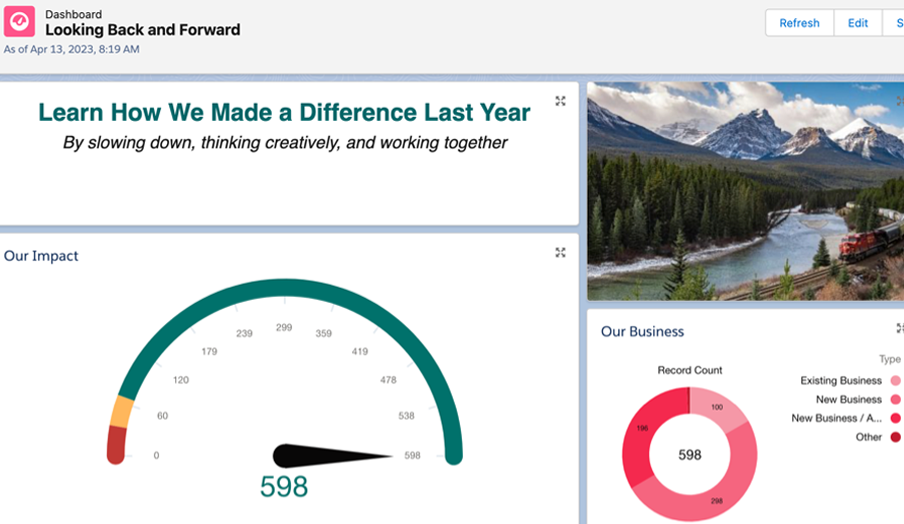
Add visual elements such as images and text to your Salesforce reports. Learn more at help.salesforce.com
2. Reports: expanded filtering options (Unlimited Edition only)
Many of our customers have requested a feature for expanded filtering options in reports. Previously, filtering was limited to just three criteria, but now you’ll be able to apply up to five filters simultaneously in your reports. This improvement gives you even greater flexibility and precision when analyzing your data.

You will now be able to use up to five filters at the same time in your reports. Learn more at help.salesforce.com
3. Dynamic forms on mobile (beta): more options for users
Another feature we believe will make a difference for you as a user is the increased customization and options in the dynamic mobile forms. The interface will be more user-friendly, and it will be possible to show or hide fields based on various criteria. These can range from the user’s role, permissions, or custom criteria you define yourself—to specific data from the system. Currently, the feature is only available in a beta version, but it will be launched in an upcoming release.

4. App Guidance: Clearer notifications for updates
A small feature, but one of great value in a new update, is the expansion of App Guidance. Previously, it was possible to set up step-by-step instructions or highlight new sections during a launch or update. In the new release, it is also possible to highlight specific fields that have been updated. This could, for example, involve adding fields or introducing a validation rule that is essential for proceeding.
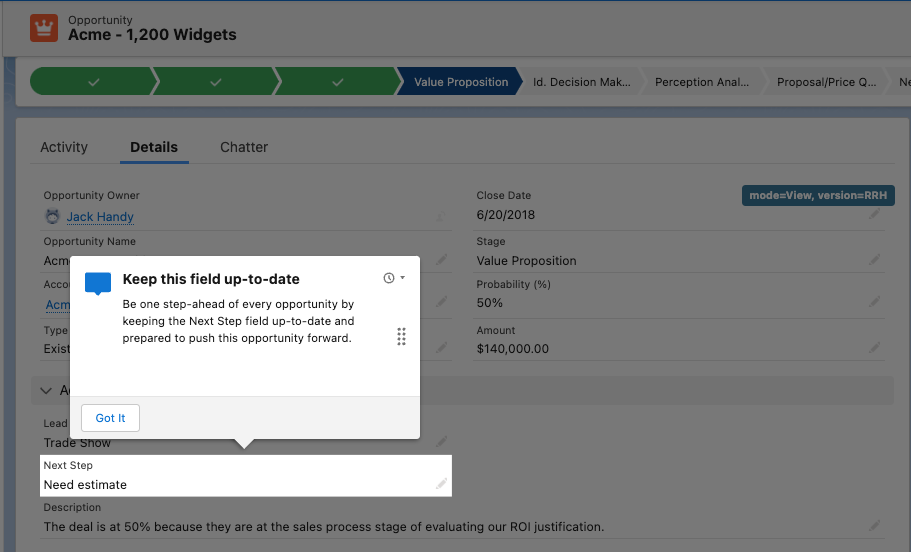
Clearer notifications for updates in App Guidance. Learn more at help.salesforce.com
5. Permissions: Extended access for specific users
In the latest release of Salesforce, specific users can now be granted expanded access to the system. This is done by granting users permissions or the ability to view information for specific parts of the system, such as certain fields or objects. This means you can gain greater insight into areas that your role requires. Learn more at help.salesforce.com
6. Related lists: Boost productivity with bulk actions on related lists (Beta)
Finally, we’ve highlighted a feature that both saves time and boosts productivity. In the Salesforce Summer ’23 Release, you can perform bulk updates on objects in related lists. Instead of going into each individual object to make the update, you can check the ones to be updated and perform a bulk update. Previously, this feature was only available in standard lists, but now it’s also available in related lists.
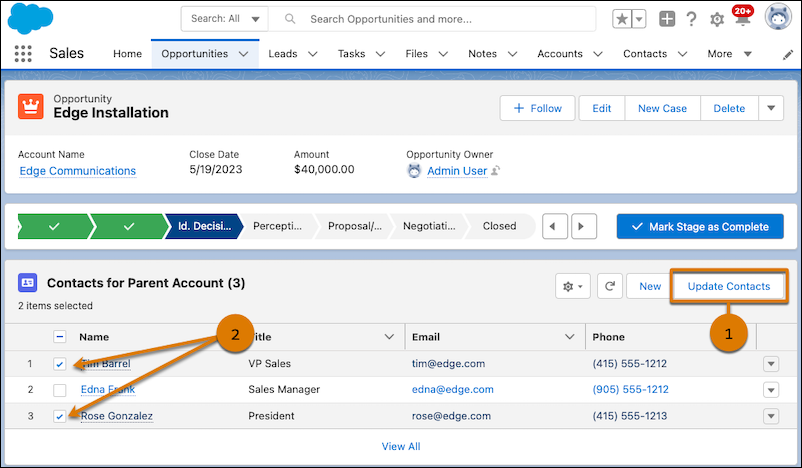
In the Summer '23 Release, you can perform bulk updates on objects in related lists. Learn more at salesforce.help.com
We hope you're looking forward to the release as much as we are! Are you curious about our favorites from the last release? Read about it here.
Contact us today
Email us at info@releye.se