

6 Common Customer Service Challenges and How Dynamics 365 and AI Can Solve Them!
Customer information spread across multiple systems, long processing times, and fragmented communication channels are some of the most common challenges we face. In this article, we’ll explore how Dynamics 365 Customer Service, Contact Center, and AI can help create a more efficient and cohesive customer service experience.
Modern customer service faces high demands—not only from customers, who expect efficient, high-quality service, but also from employees and managers, who expect flexible, user-friendly CRM systems that enable them to respond proactively, rather than reactively, to customer challenges. These systems also need to integrate the many communication channels that customers prefer to use.
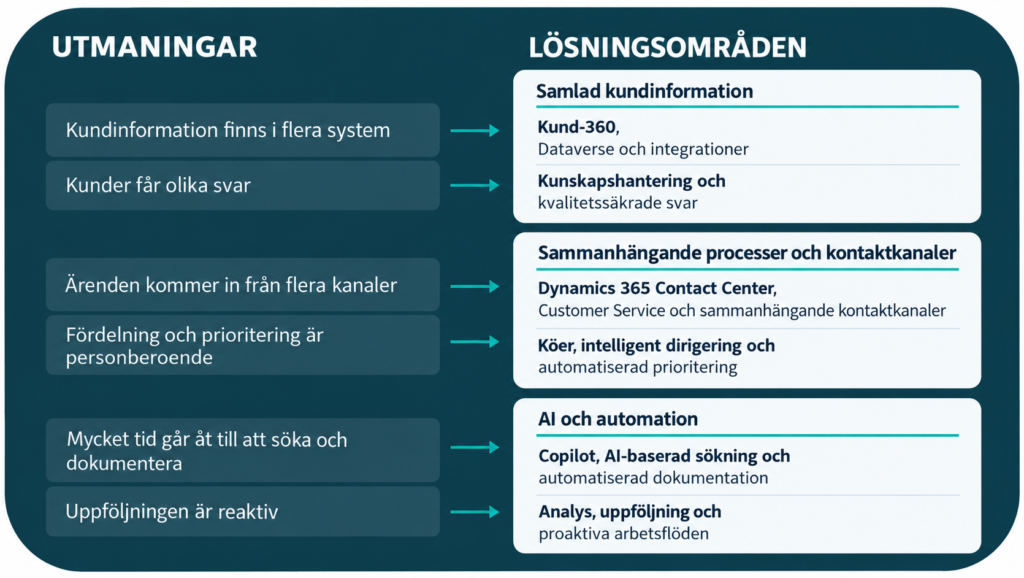
Common Challenges in Customer Service
Even businesses with already established CRM or business systems may have a fragmented customer service process. Some of the challenges we at Releye see most frequently among our customers—and which we are constantly working to address—are:
1. Customer information is stored in multiple systems and is difficult to access
Customer contact information may be stored in the CRM system, order and invoice information in the ERP system, contracts in a document database, and past customer communications in employees’ individual inboxes.
The customer service representative must then switch between multiple systems and may need to contact other employees to get a complete picture of the customer’s issue and challenge. This increases the handling time and the risk of missing relevant information.
2. Inquiries come in through several different channels
Customers contact the business via phone, chat, email, social media, and self-service portals. If these contact channels are not integrated into a single process, it becomes difficult to maintain a consistent history, and it may be hard to ensure that each inquiry has a clear point of contact.
3. A significant portion of an employee’s time is spent searching for and documenting
Employees often need to look for answers in contracts, product documentation, internal instructions, and previous cases. After the interaction, the conversation or case must also be summarized manually.
It takes time away from the actual customer interaction and can lead to inconsistent documentation quality.
4. The allocation and prioritization of cases depend on the individual
Manual sorting of incoming cases can create bottlenecks. Cases risk being assigned to the wrong person or prioritized differently depending on who receives them.
5. Customers receive inconsistent responses
If knowledge is scattered across documents, personal notes, and individual employees’ experience, responses can easily become inconsistent. This also creates a dependency on key personnel.
6. Follow-up is reactive, not proactive
When information and workflows are inadequate, it becomes difficult to monitor service levels, identify recurring causes, and pinpoint where the process is stalling. The organization then risks taking action only after the customer is already dissatisfied.
Regardless of industry, many of these challenges fundamentally revolve around established processes and work methods. How can you ensure that the right information is available, that cases are handled consistently, and that the customer receives a consistent experience? These are the kinds of issues that Dynamics 365 Customer Service and Contact Center are designed to address. Let’s take a closer look at how.
Customer Service Processes in D365 Customer Service
Customer Service is Microsoft’s solution for structured customer service and case management. The solution is built on Microsoft Dataverse—the shared information platform—and is configured based on the organization’s processes, roles, and information model. The solution supports the following areas, among others.
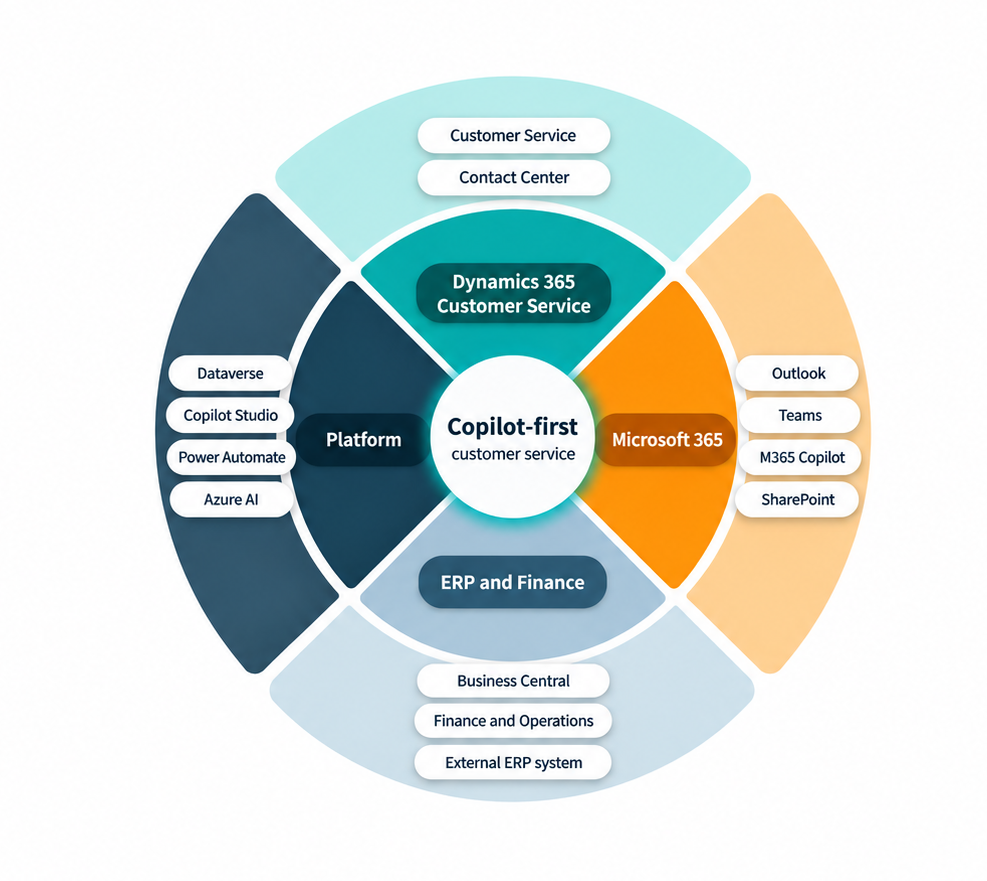
Case Management
The organization’s customers use email, web forms, chat, and other contact channels to submit cases. In Dynamics 365 Customer Service, all records and information are linked together to ensure a traceable process from initial contact to resolution. Information about the customer’s details, products or services, contracts, and previous cases is immediately available to employees. Cases are classified based on priority, category, and the responsible department.
Queues and Routing
When cases are classified, they can also be routed based on a variety of factors, such as case type, expertise, language, product, customer segment, priority, and available capacity. The goal is to increase the likelihood that the case reaches the right person as early in the process as possible.
Service Levels and Escalation
Service Level Agreements (SLAs) can be used to monitor metrics such as time to first response or time to case closure. If a case is at risk of exceeding the agreed-upon timeframe, the system can trigger notifications or escalation actions.
Knowledge Management
A structured knowledge base makes it possible to reuse quality-assured answers, instructions, and solutions. This knowledge can be used by both customer service representatives and in digital self-service.
Automated Processes
The platform’s automation tools allow activities and actions to be performed without manual intervention.
– Confirmation to the customer that the case has been received
– Reminders about actions
– Approval and authorization
– Case escalation
– Transfer of information to other processes
Contact Center Processes in Dynamics 365 Contact Center
If Customer Service is described as a system that primarily handles the case management process, then their Contact Center is the system that handles conversations. When both are used, employees experience them as a cohesive system. At the same time, case management and contact channels can be configured and developed based on their respective needs. This makes it possible, for example, to change routing, telephony, or digital channels without having to rebuild the entire case management process.
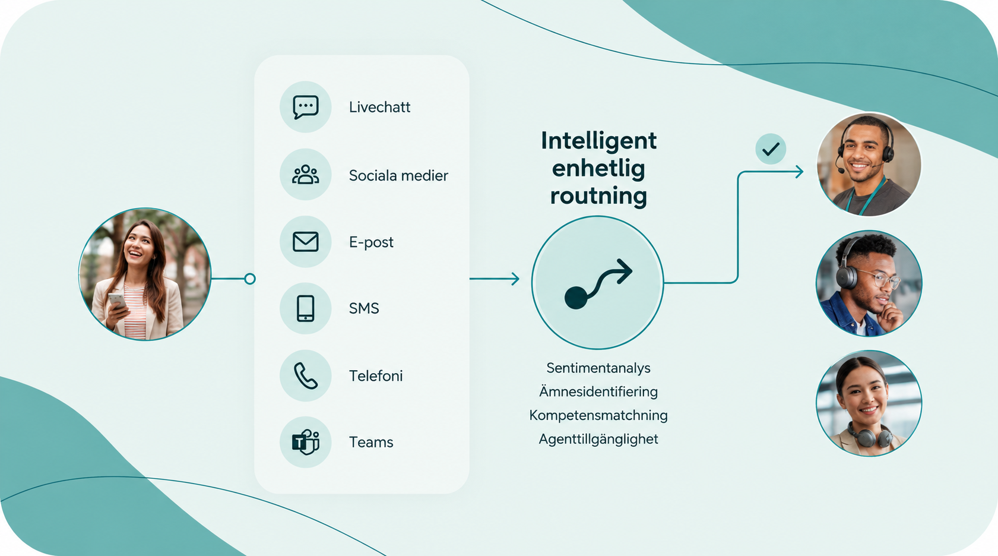
For organizations with an existing, comprehensive CRM system, there is also the option to use Dynamics 365 Contact Center as a standalone product. This also applies to CRM systems outside of Microsoft’s own portfolio. In this case, Contact Center handles conversations through the designated contact channels and creates cases in the external CRM system via integrations. Contact Center itself enables channel management, queue management, conversation routing, conversation history, and agent support during ongoing calls. It also allows users to make calls and use phone numbers directly from Microsoft Teams.
The Contact Center provides support for customer interactions via telephone and digital channels such as email, chat, text message, or social media. The solution is tailored to the business’s needs in terms of preferred contact channels.
When a customer contacts us, the customer is identified, and the employee receives the relevant customer information in their workflow.
Whether a customer contacts the business by phone, email, chat, or any other channel, the customer service representative needs access to relevant information in order to assist the customer. That is why the unified customer view is a central part of both customer service and the contact center. This is where the representative gets an overview of the customer, past interactions, and the current status.
A 360-degree view of the customer for customer service
In customer service, accessible and relevant customer information is one of the most important elements of providing excellent service. Customers expect their details, information, and previous interactions to be easily accessible so they can receive prompt and accurate assistance. Customer service representatives also have needs, including access to a simple, clear customer summary that contains the most essential information.
At Releye, we usually refer to this overview as a “Customer 360.” In other words, it’s the part of the system where employees and managers can view a comprehensive customer profile with all relevant information readily available. The information typically included in a Customer 360 view is:
– Overall customer status (e.g., prospect, customer, or former customer)
– Organizational hierarchy for parent/child accounts or contacts
– Current contact/account information
– Products and services purchased by the customer
– Orders, returns, and delivery history
– Invoices and payment status
– Agreements, warranties, complaints, and service commitments
– Open and historical service cases
– Previous contacts and activities
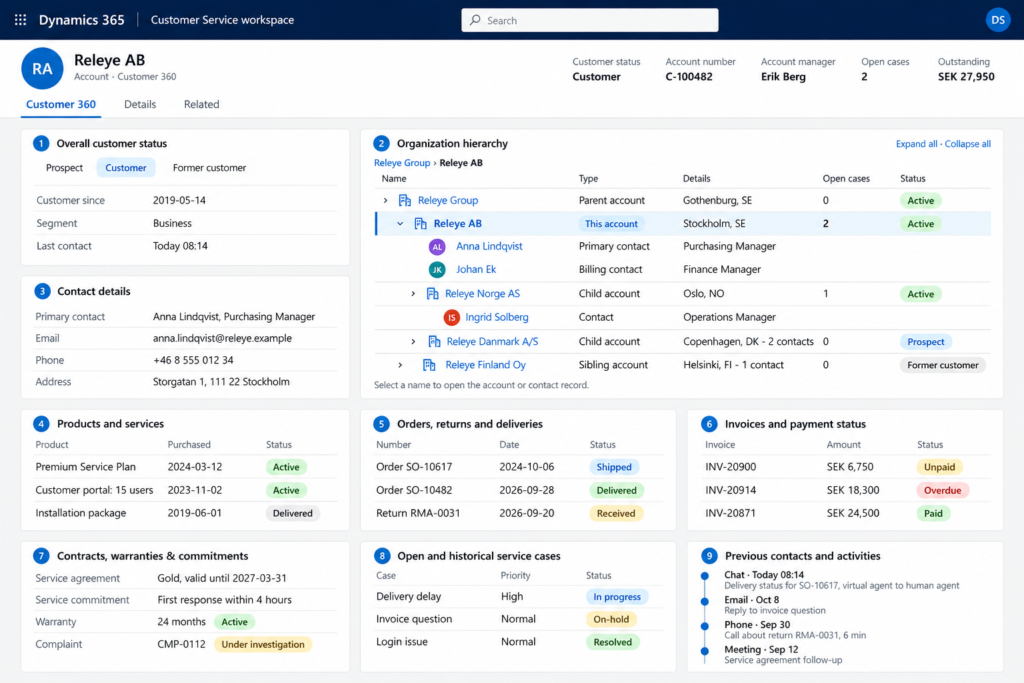
A 360-degree view of the customer within Microsoft Dynamics can retrieve information from other systems—such as sales or business system data—using plug-ins or custom integrations. Employees can then get a complete picture of customer engagement in one place, within a single system.
How can we navigate the challenges of AI?
In an AI-focused customer service solution, AI is not added as a standalone feature after implementation. Instead, every step in the customer service process is analyzed to determine where AI can provide concrete support.
Microsoft offers a large library of AI features within and around Dynamics 365. These various AI features work across all Dynamics 365 applications, and many of them are designed specifically to facilitate customer service and customer data management.
However, an AI-first strategy does not have to mean AI without oversight. It means that every process is designed with the following question in mind:
Where can AI and automation reduce unnecessary manual work while allowing the business to maintain control over quality, safety, and customer service?
So where can AI be most useful?
AI helps employees find answers
Dynamics 365 provides access to relevant information, and AI helps employees quickly find this information. For example:
– Knowledge articles
– Internal instructions and policies
– Product documentation
– Case history
– Historical customer communications
– Contracts
Responses should be based on the organization’s trusted sources of information and presented in a way that allows employees to evaluate them before using them in conversations with customers.
AI suggests and drafts responses
Microsoft’s Copilot agents help employees create draft responses based on conversations, the context of the case, and available knowledge. The response can be reviewed and customized before being sent. It is also possible to tailor responses to the desired structure and tone.
AI summarizes conversations and cases
AI summaries are available in the customer service agent’s interface, such as within a case or a conversation. The summaries give agents a quicker overview of the situation and reduce manual administrative work.
AI supports classification and process steps
Based on the content of an incoming chat or email, AI and automation rules can handle classification, prioritization, and handoff. The system can also suggest the next best actions for the employee handling the case.
AI Agents and Self-Service
Using Microsoft Copilot Studio, organizations can build their own AI agents for digital self-service and automation. The agents can be fed information from CRM systems and other knowledge sources, enabling them to handle a dialogue directly with the end customer. The process can be designed so that sensitive or complex issues are automatically routed from the agent to a human customer service representative.
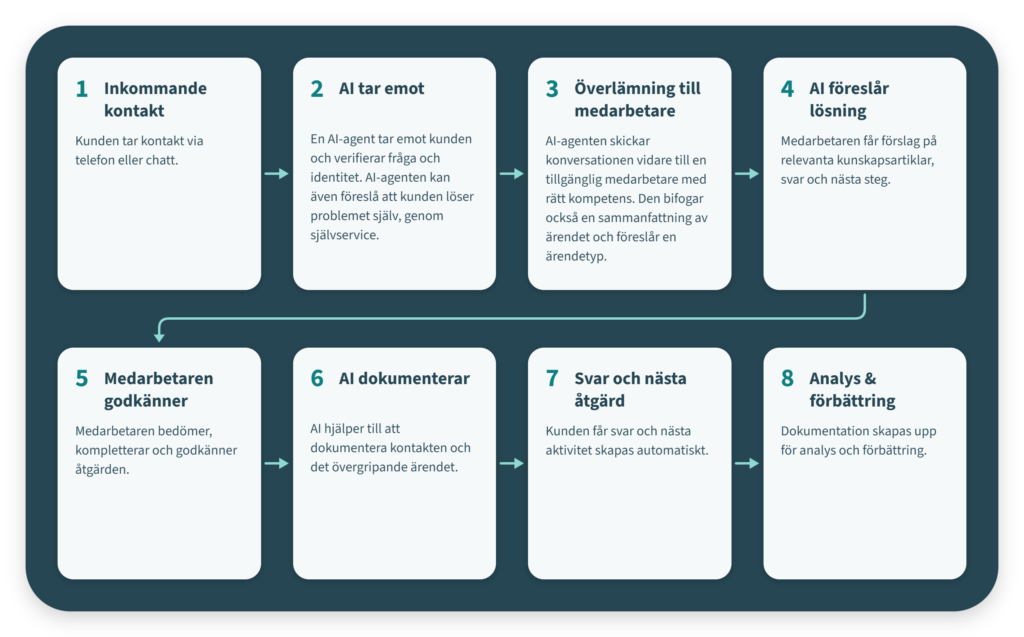
This is what an AI-focused work process looks like:
The AI features mentioned above enhance the end-user experience, efficiency, and quality, along with the overall customer service processes in Dynamics 365. A process that combines AI and a service representative might look like this:
Donec interdum, metus et hendrerit aliquet
Requirements and Licenses
AI does not automatically compensate for unclear processes or poor-quality information. To truly benefit from these tools, therefore, a structured, sustainable effort is required that encompasses both operations and technology. Such an effort should include:
– Clear processes and designated process owners
– Quality-assured and documented knowledge
– Relevant and accessible customer information
– Data protection and information security policies
– Human oversight for sensitive decisions
– Measurement of quality and business value
– Ongoing management of processes, instructions, and AI support
Another prerequisite is, of course, licensing. Licensing for Dynamics 365 Contact Center and Customer Service must be evaluated based on the solution that will actually be implemented. Microsoft offers various licensing tiers and add-ons depending on factors such as capacity requirements, the need for different user roles, functionality, and contact channels. The following factors can influence licensing requirements:
– Which contact channels will be used in Dynamics 365 Contact Center
– Which customer service processes will be performed in Dynamics 365 Customer Service
– Which users—and how many—are full-fledged agents
– Usage-based services, such as telephony and digital messaging
– Copilot and AI features
– Externally facing self-service pages
– Use of Power BI for extensive reporting requirements
– Integration services and Azure usage
Organizations that already use Microsoft 365, Business Central, or other Dynamics products may also have technical and commercial foundations that are valuable to build upon.
What can Releye help with?
Technology and systems are only part of a successful customer service initiative. To create real value, the solution must be based on the business’s challenges, clear goals, and customer needs.
At Releye, we guide you through the entire process—from assessing your current situation and developing a strategy to implementation and ongoing development. With our broad expertise in customer service and Microsoft business applications, we can design solutions that take into account both your business needs and your existing systems.
A first step is to map out your customer service processes and identify where improvements can make the biggest difference. In such an analysis, we look at, among other things:
- Overall Goals and Current Situation
- Customer Service Processes and Reasons for Contact
- Channels and Workflows
- Manual steps and bottlenecks
- Information and Knowledge Needs
- Existing systems and any integrations
- Reporting Requirements
- Appropriate and Effective Areas for AI and Automation
Based on the assessment, we can work together to identify which initiatives create the most value and how you can take the next step toward a more efficient and cohesive customer service experience.
Would you like to improve your customer service with Dynamics 365 and AI?
Schedule a no-obligation consultation with us.
We'll discuss your challenges, opportunities, and how you can take the next step toward more efficient and cohesive customer service.
Contact us today!

Written by
David Bogren
Application Consultant at Releye
Contact us today
Email us at info@releye.se