

Våra favoriter från Salesforce Spring ‘22 Release
I takt med att våren står på glänt har Salesforce släppt sin nya Salesforce Spring ‘22 Release. Martin Broliden och Jessica Kullberger är affärskonsulter på Releye och har listat sina favoriter från realesen. I uppdateringen hittar vi bland annat dynamiska och förenklade lösningar, som sparar både tid och engagemang. Detta ökar även produktiviteten utifrån behov och uppföljning i rapporter, vilket gör att arbetet nu kan effektiviseras på en flera olika sätt. Nedan har vi sammanfattat favoritfunktionerna.
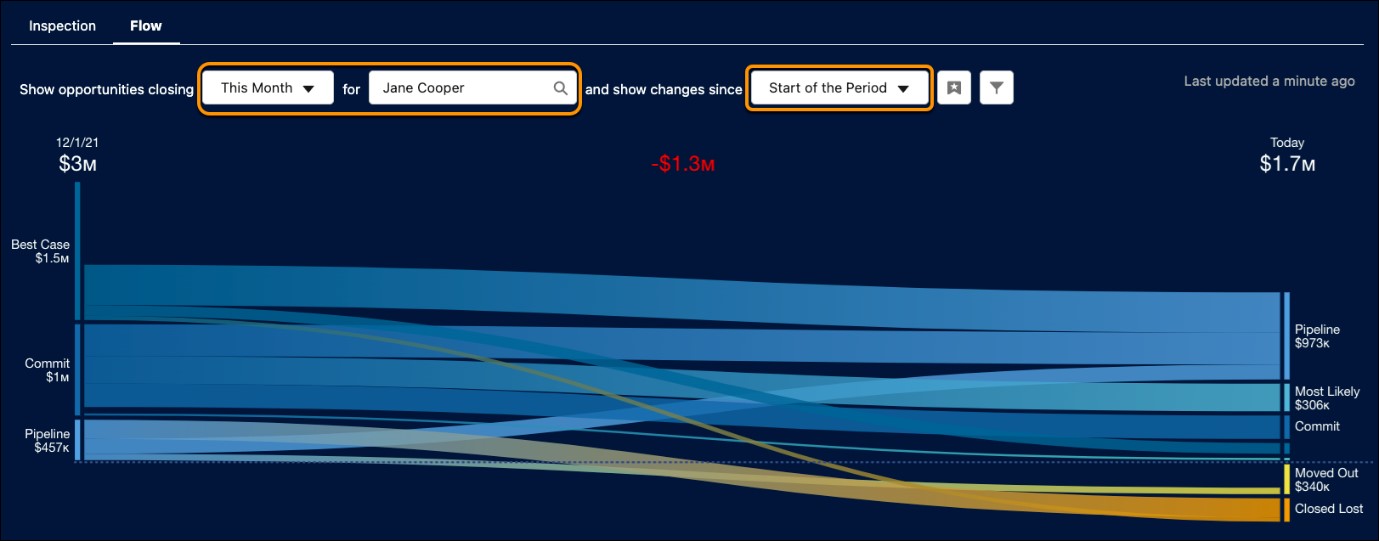
1. Sales – Se din Pipeline i en Dynamisk Graf
Med Pipeline Inspection kan du följa dina säljprojekt utifrån olika filtreringar, såsom användare eller team, start- och slutdatum samt olika prognoskategorier. Denna dynamiska och användbara lösning tillåter både historisk uppföljning och nutidsanalys utifrån dina behov och går att implementera för din organisation med Enterprise eller Unlimited Edition.
2. Rapporter – Hitta rätt Rapport-typ för din rapport
När du skapar en ny rapport ser du direkt dina senast använda rapporter och nödvändig information om vem som har skapat den och när. Detta sparar både tid och arbete genom att se vilka objekt som är kopplade till rapporttypen samt vilka fält som du behöver.
3. Rapporter – Förbättrad in-line redigering
För att spara tid och effektivisera ditt arbete kan du nu i Salesforce Spring ‘22 Release redigera flera fält samtidigt i rapporter utan att gå till redigeringssidan och aktivera den. Även redigering av ett fält som har ett annat beroende hamnar i Pending tills rapportern är sparad. Detta är en önskad funktionalitet som underlättar massredigering av fält i rapporter.
4. Marketing Cloud – Nya dimensioner och mätetal i Datorama Reports
Användare med “Datorama Reports Advanced-licens” har nu tillgång till en utökad lista med e-postrelaterade dimensioner och mätetal. De kan nu till exempel skapa rapporter för att djupdyka i resultat baserat enhetstyp eller jämföra öppnings- och klickresultat mellan enheter.
5. Marketing Cloud – Utökad Enstein-funktionalitet för optimering
Nu kan du använda Einstein Send Time Optimization för de e-postmeddelanden som skickas från Automation Studio – inte bara Journey Builder. Einstein Send Time Optimization är en funktion som skickar e-postmeddelanden till dina kontakter vid bästa förutspådda tidpunkt, för varje enskild mottagare, för att maximera resultatet.
6. Marketing Cloud – Förbättrad funktion för Quick Send
När du använder ”Quick send-funktionen” från “Case” eller “Opportunity” kan du nu använda information från objektet för att bland annat öka relevansen i innehållet och definiera vägar i kundresan.
7. Pardot – Förbättrad Landing Page Builder
Anpassa enkelt dina målsidor och formulär med den förbättrade ”Enhanced Landing Page Builder”. Applicera färger, typsnitt, marginaler och mer med det inbyggda verktyget. Använd layoutmallar och lägg till skript för att anpassa sidhuvudet eller sidfoten på sidan. Du kan nu även konfigurera inställningar för att dirigera om trafiken till landingssidor som avpublicerats.
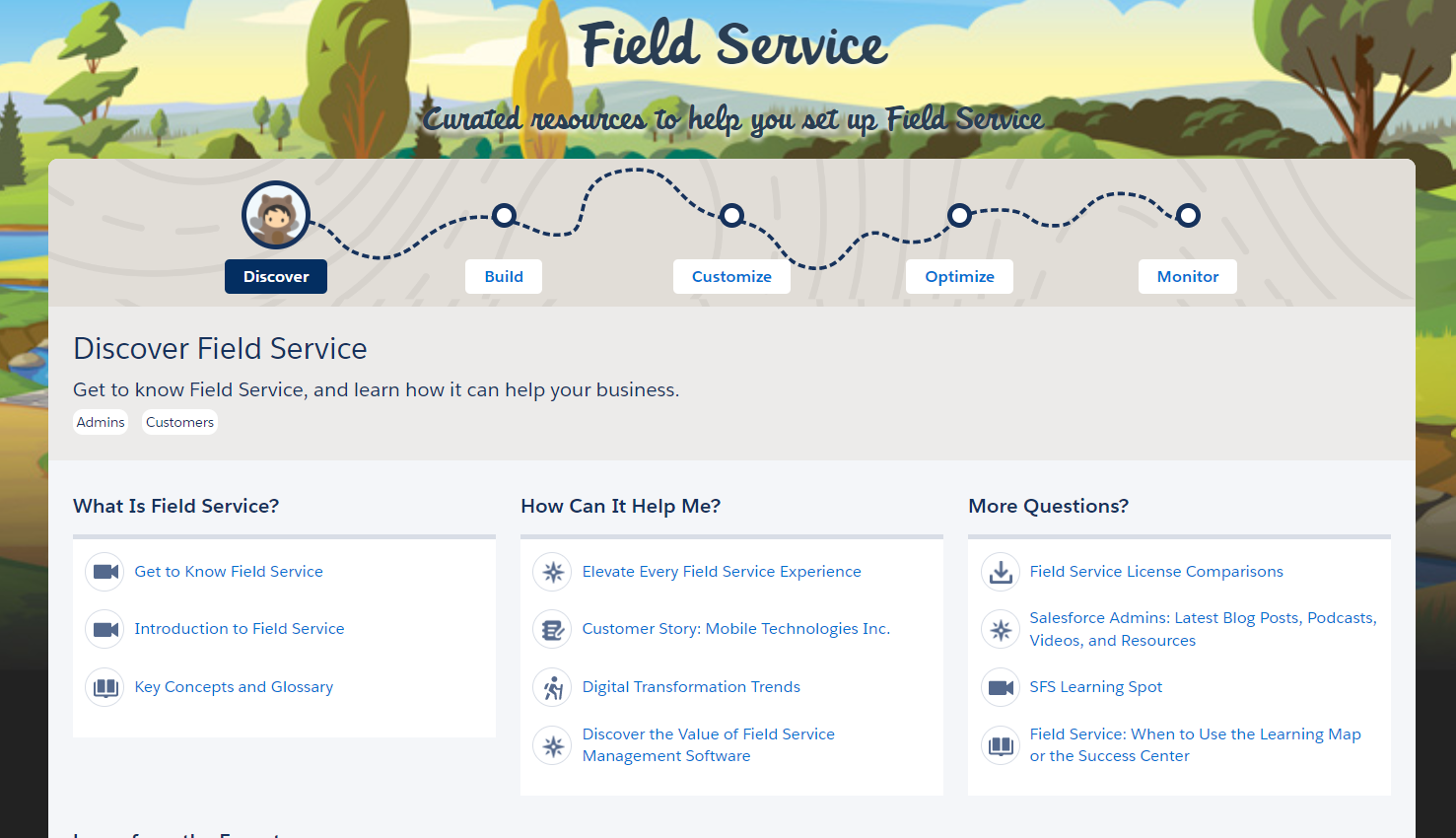
8. Field Service – Fokus på Field Service innehåll
Genom Field Service inlärningskarta kan du nu i Salesforce Spring ‘22 Release hitta resurser för att lättare navigera dina installationer. Hemsidan hjälper dig som kund att förstå nyckelkoncept, funktionalitet och håller dig uppdaterad på de senaste uppgraderingarna i verktyget. Du får även en ’roadmap’ vars översikt hjälper dig utforska, bygga, konfigurera, optimera och sedan övervaka Field Service. Denna karta riktar sig till administratörer, klienter, partners och samtliga som är intresserade av att lära sig systemet.
9. Field Service – Administration och processer
Se till att alla dina kunders krav uppfylls genom att lägga till regler som upprätthålls i möten som dina kunder schemalägger. Du kan nu koppla flöden och procedurer till kontons arbetsplaner då ett företag ofta har säkerhetsprotokoll för sina mobila arbetare. Med kontospecifika arbetsplaner kan du bifoga dessa krav till arbetsordern som är tilldelad företagets konto.
10. Field Service – Resurshantering
Kombinera flera servicemöten till ett paket så att mobila medarbetare kan fokusera på att förbättra mobila medarbetares integritet och säkerhet genom att kontrollera vem som kan se deras plats. Lägg till en färgkod för ett skift för att lättare se status eller tilldelade resurser.
11. Lös incidenter snabbare med integrerade vägar till lösning
När en akut incident inträffar för dina kunder kan incidenthantering göra det lättare för dig att få undan potentiella komplikationer innan de eskaleras till allt för stora. Använd färdiga sidlayouter för en fullständig incidenthantering med SLA-hanteringsverktyg för att snabbt komma igång. Du kan även bedöma omfattningen av incidenten med relaterade listor samt se till att rätt personer är medvetna om den så snart den inträffar via routing i Omni-Channel. Slutligen kan du också använda arbetsplaner och processer för att snabbt hitta en lösning.
12. Tilldela inkommande samtal med Omni-Channel Flows
Tilldela inkommande samtal till rätt användare eller handläggare genom att definiera tilldelningsregler i samma process som för andra konfigureringar. Tillgängliggör realtidsdata som ledningen kan ta del av genom Omni Supervisor och anpassa handläggarens upplevelse genom visuella verktyg såsom pop-upsmed information kring de inkommande samtalen. Denna nya funktion har tidigare funnits i Beta-versionen men är nu tillgängligt för alla!
Kontakta oss idag
Eller ring oss på +46 8 55 80 25 08