

Our 3 Favorite Features in the Marketing Cloud Growth/Advanced Spring '25 Release
Just a quick reminder and a point to note before we dive in:
The new product names can be confusing! When we refer to Marketing Cloud, we mean Marketing Cloud Growth and Advanced, which Salesforce launched in 2024. The old Salesforce Marketing Cloud (formerly ExactTarget) is now called Marketing Cloud Engagement, and its product release is scheduled for February 21, 2025. That product is therefore not covered in this post.
We at Releye are incredibly excited and proud to be among the first in Sweden to implement Marketing Cloud Advanced for one of our largest clients. Marketing Cloud Advanced was recently released in November 2024 (as an advanced version of Marketing Cloud Growth), but thanks to our partnership with Salesforce, we’ve had the opportunity to both test and analyze the tool to determine if it’s the best solution for our client. You will definitely be hearing more about Marketing Cloud, but also about Data Cloud, which will play a crucial role in our clients’ long-term goals of achieving an omnichannel 360-degree view of the customer.
Here are three of our favorite features in Marketing Cloud (available in both Growth and Advanced):
A simpler and faster setup
Marketing Cloud Growth and Advanced are both new products built on Salesforce Data Cloud (Salesforce’s own customer data platform for harmonizing, segmenting, and activating customer data). It’s important to note that you must first install Data Cloud in your Salesforce environment in order to use Marketing Cloud. In the new release, installing Marketing Cloud Growth/Advanced has become both easier and faster.
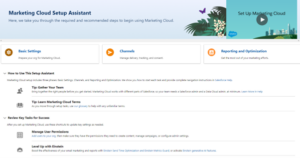
- With the new Setup Assistant, it’s now easier to see how far along you are in the installation process and which steps are important to complete.
- Data Cloud Setup already includes a Sales Data Kit. Previously, you had to install and update it on a separate page. The Sales Data Kit is the most commonly used data source in Data Cloud. Through Data Cloud, you can create segments that are used in Marketing Cloud.
- Authenticating email domains is now easier thanks to the new guided setup. We all know how complex domain registration, confirmation, and activation can be. This often involves a lot of back-and-forth between Salesforce administrators and DNS administrators. A guided setup should help simplify this process.
Welcome to WhatsApp
WhatsApp is becoming a new communication channel through Marketing Cloud, which can increase reach now that the app is used by more users worldwide. New opportunities include, among other things:
- Create WhatsApp campaigns using the "Send" element in Flow.
- Flow Builder with two-way communication, meaning sending and receiving responses.
- A WhatsApp message editor that supports audio, video, and documents.
- A dashboard providing insights into delivery rates, read messages, replies, and other key metrics. Enabling and integrating WhatsApp on Marketing Cloud Growth/Advanced requires a WhatsApp Business account, and recipients will be directed to a Preference Page to manage their consent.
Enabling and integrating WhatsApp into Marketing Cloud Growth/Advanced requires a WhatsApp Business account, and recipients will be provided with a Preference Page to manage their consent.
An improved user interface
The promise of Marketing Cloud Growth/Advanced was not only that they are built on Core and utilize the same architecture and model as Sales and Service, but also that marketing automation would become faster and easier. As a result, the user interface has become more intuitive when creating emails and landing pages:
- Undo and Restore features are now available in email, which means you don't have to worry about losing your work. You can use both buttons and keyboard shortcuts.
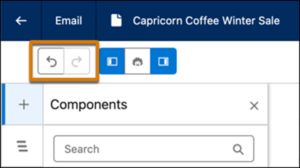
- It’s now easier to add or move sections in an email or landing page. Select a section and click the + button at the top or bottom of the section to add a new section. Rearrange sections using the improved drag-and-drop feature.
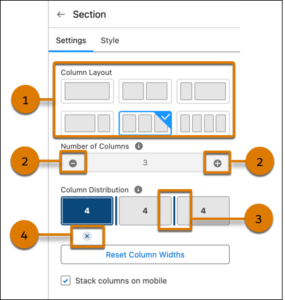
- Easily adjust the layout of sections in emails or landing pages. Use preset column layouts (1), add or remove a column (2), drag the handle to resize columns (3), or remove a column (4).
Would you like to know how these improvements can benefit your organization? Don’t hesitate to contact us at Releye—we’ll help you implement the latest updates to Marketing Cloud and maximize your results.
Contact us today
Email us at info@releye.se