

New features in Microsoft Release Wave 1, 2025 that boost sales
Microsoft’s Release Wave 1, 2025 is here with several new features for Dynamics 365 Sales, designed to make sales teams more efficient, focused, and productive. A particular focus is on the new Sales Qualification Agent, which uses Copilot and AI-powered tools to help salespeople concentrate on the most promising leads, follow up on customer interactions, and build a stronger pipeline.
In this overview by Lina Axelsson, our application consultant, you’ll get a clear picture of the most interesting new features—and how they can deliver tangible business value for you and your organization.
The Sales Qualification Agent in Dynamics 365 consists of three collaborating autonomous agents that work in the background to help salespeople effectively build a qualified pipeline and prioritize their leads:
- The Prioritization Agent analyzes data and signals to assess factors such as authority, budget, and other criteria in order to identify the leads most likely to result in closed deals. The agent also provides a list of the leads it determines that salespeople should focus on and prioritize.
- Research Agent collects and processes data from CRM systems and public sources, and uses existing Copilot features to create a comprehensive view of customers.
- Engagement Agent creates personalized emails to reach out to leads based on collected information, which helps increase response rates.
Identify your most valuable leads—without wasting time
Identifying your most valuable leads can be both time-consuming and uncertain. Many salespeople spend far too much time on leads that ultimately go nowhere. This is where our new feature— the Sales Qualification Agent —comes into play.
How the agent helps your sales team
With the help of AI, the agent helps the sales team focus on the most relevant leads.
This is done by:
- Display prioritized leads directly in the sales rep's workflow.
- Suggest the next step in the process.
That means less guesswork and more clarity in everyday life.
The agent continuously analyzes leads in the pipeline—based on multiple data sources. The hottest leads are automatically flagged, and the salesperson receives an explanation of why these particular contacts are worth prioritizing.
Manually reviewing leads takes time—and carries the risk of missing out on opportunities.
By automating lead prioritization, salespeople gain:Â
- Faster access to the most promising contacts.Â
- Concrete insights into how they should be assessed.Â
 The result? More accurate decisions, better conversion rates, and a greater chance of reaching your sales goals.Â
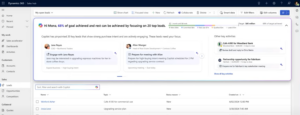
Sales Qualification The agent appears at the top of the list view for leads. In viewabove shows prioritized leads, how the salesperson is performing in relation to set sales targets and other important activities that the salesperson should follow up on.
Get a complete picture of your leads—automated and data-drivenÂ
Building a strong, high-quality pipeline often requires a significant amount of manual work. Many salespeople spend a large portion of their time on prospecting and research—time that could instead be devoted to customer engagement and business development. With the new – Research Agent — that process becomes significantly easier.Â
The agent who does your research for youÂ
Research Agent automates much of the preparatory work by collecting and analyzing data from multiple sources:Â
- your CRM.Â
- third-party sources.Â
- public sources such as social media.
Based on the information gathered, the agent can recommend the right time to qualify a lead. It takes into account factors such as the company’s financial status, strategic initiatives, and identified business needs.Â
A 360-degree view of every leadÂ
Instead of starting from scratch, the salesperson gets a complete picture of both the lead and the company.
The agent can:
- determine whether any of your colleagues already have a relationship with the contact.
- suggest additional relevant contacts within the company.
- provide an overview of existing business opportunities related to the company or individual.
Not only does this create better conditions for a personalized and relevant dialogue—it also saves valuable time in the sales process.Â
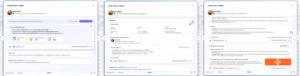
A pop-up shows more information about the lead and the information collected by the agent, as well as other key information about why this lead should be prioritized.
Keep track of your follow-ups—without any extra effortÂ
Keeping track of all follow-ups is a challenge for every salesperson.
Here is the new Engagement Agent can help by:Â
- compile follow-up items from emails and other communication channels.Â
- suggest relevant content for follow-up.Â
- prepare meeting agendas and recommend participants.Â
- customize email content based on collected information.
Â
All to help the salesperson work efficiently, keep the conversation moving—and never miss an important step.Â
From reminders to proactive actionÂ
With Copilot behind them, the risk of important tasks falling through the cracks is reduced. Salespeople can focus on what actually creates value—building relationships and driving deals forward—while the agent keeps track of the details.Â
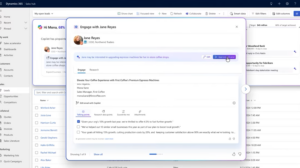
In the same pop-up , there are communication suggestions generated by the agent, where the salesperson can easily adjust the content or tone of the message before it is approved and sent..Â
Sales Qualification Agent is currently the moment scheduled to be available in July 2025.Â
Filter views by naturenatural languageÂ
Another new feature in the Sales app is that you can now filter, sort, and find data using natural language. This makes it easier than ever to work with views and business data—without having to build advanced filters. Â
Type in what you're looking for—let the system do the restÂ
Instead of manually adjusting columns and filters, you can now simply describe what you want to see. Â
Example:Â “Business opportunities worth over 500,000 SEK expected to close this month.”
The system analyzes the text and automatically filters out relevant sales opportunities. This saves both time and frustration—and makes it easier for salespeople and teams to quickly find what they need, without having to manually adjust column filters or create advanced views.Â
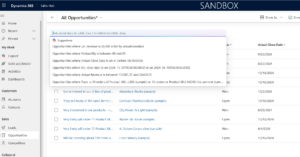
This feature is currently in preview, along with the ability to use Copilot to visualize data in a view as a graph, which means that these features are not yet fully developed. Copilot creates a visualization for the view based on the visible columns and filters. Once the graph has been generated, you can switch to a different chart type or adjust which data is displayed.
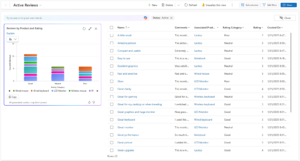
Once you're happy with the graph, you can click the Copy button to copy it to the clipboard and then paste it into your documents and presentations.
Curious about what Copilot in Dynamics 365 or Sales Qualification Agent can do for you and your team? Feel free to reach out to Lina Axelsson—she’d be happy to tell you more and help you get started!

Lina Axelsson
Application Consultant at Releye
Contact us today
Email us at info@releye.se