

Highlights from Microsoft Release Wave 1 2024
In an era of constant development and innovation, it’s exciting to see how Microsoft continues to lead the way with its new features in Release Wave 1 2024. With a special focus on Copilot and AI, along with upgrades in Sales, Customer Service, and Customer Insights – Journeys, there’s a wealth of new tools and features to look forward to. Explore some of the most exciting features with us.
Sales
1. New look in Dynamics 365
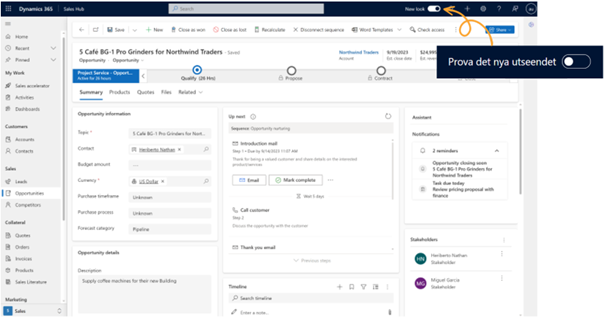
You may have already noticed the “Try the new look” button that came with the latest update this fall. Now Microsoft is taking the next step with the new interface, which is automatically enabled for existing apps. The updated look features new shading and lighter background colors for a refreshed user experience.
2. Link activities to multiple related entries
Previously, it was not possible to link an activity entry to multiple related parties, but with the new “Partylist” attribute, this is now possible. Users can easily link activity entries to multiple parties, such as an email, call, task, or meeting that involves multiple accounts, cases, or business opportunities.
3. Previewing sequences
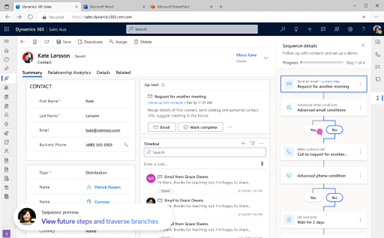
Sequences help salespeople follow a structured workflow and perform tasks in a set order. Now, salespeople will also be able to preview all sequence steps linked to a record and get an overview of the total number of steps in the sequence, the total number of days spent, the time required to complete the sequence, and which steps and activities have been completed or are upcoming. You will also be able to see which other users have completed various steps and who is responsible for upcoming tasks.
4. Customize the lead qualification process
Now you can easily customize the lead qualification process to meet your specific needs and your company’s unique requirements. With flexible tools and settings, you can tailor the process to ensure that only the most relevant and promising leads reach your sales team, thereby increasing efficiency and improving conversion rates. Among other things, this makes it possible to generate multiple sales opportunities from a single lead.
5. Copilot in full-screen mode
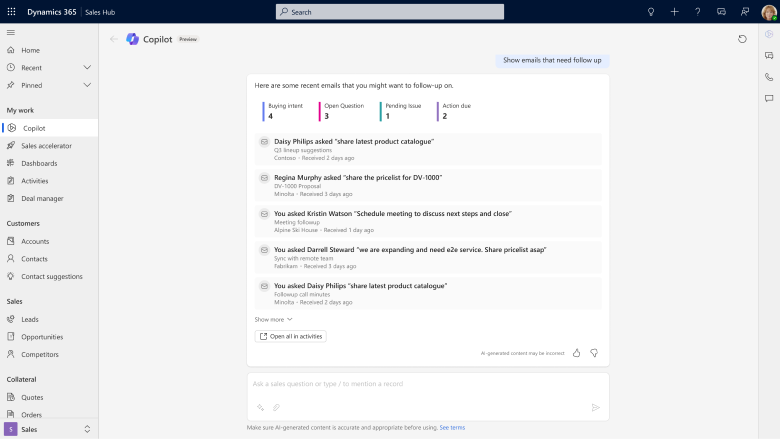
Instead of accessing Copilot only through the chat panel on the right side of Dynamics, Copilot is now also available in full-screen mode. The interface provides you with an expanded workspace and helps you focus more on your conversation with Copilot.
6. Get sales insights from Copilot, answers based on SharePoint documents, and email assistance
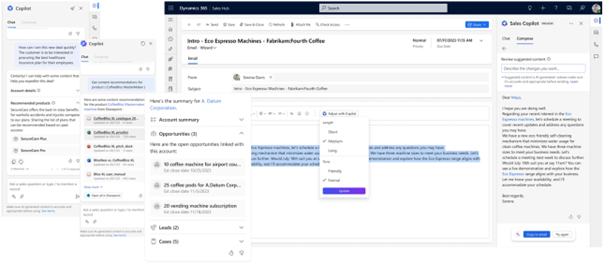
As a sales representative, you’ll be able to use Copilot to summarize records, find out about recent changes to a lead or opportunity record, get an overview of accounts and associated opportunities or leads, or get help preparing for meetings. In addition, Copilot helps you streamline email management by summarizing long email conversations and generating email responses based on prompts and suggestions for tone and length. With Copilot in Dynamics, you can now also quickly get answers based on information and documents stored in SharePoint.
Customer Service
1. Create multiple cases when an email is sent to multiple mailboxes
You can now configure Dynamics so that when an email is sent to multiple queue-enabled mailboxes, a case is created for each individual mailbox. This gives users a complete overview of customer issues and enables seamless case management across different teams. By eliminating the need to transfer cases between different queues, response delays are minimized and overall case management is improved.
2. Improved email experience
Dynamics introduces new and improved attachment management to make it easier to manage emails. Now you can easily drag and drop attachments into your emails, receive reminders if you forget an attachment mentioned in the message, and easily copy attachments between different emails. In addition, you can easily search for recipients, customize how email addresses are displayed, and easily move recipients between the To, Cc, and Bcc fields.
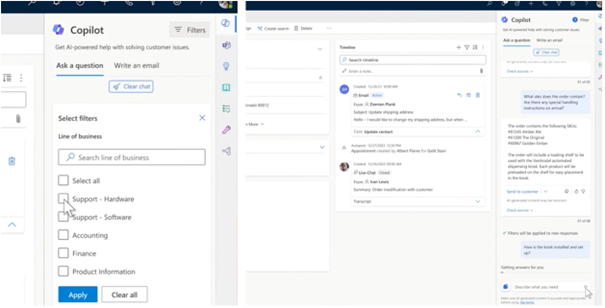
3. Get relevant Copilot results using filters and validate the answers
You can now get even more relevant answers from Copilot by filtering the type of data Copilot uses to generate responses. This ensures that Copilot generates answers that are relevant to your needs. In addition, Copilot now provides source references for its answers to increase transparency and enable validation of the answers. This allows customer service representatives to quickly provide accurate and reliable information to customers.
Customer Insights – Journeys
1. Avoid sending duplicate emails to contacts with the same email address
Now you can ensure that each email is sent only once to each unique email address, even if your contact list contains multiple contacts with the same email address.
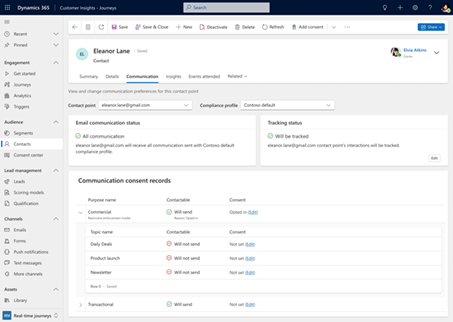
2. Manage consent from contacts and leads
Keeping track of the consent that contacts and leads have given for email campaigns is crucial, and the updated view makes it easier to get an overview of consent. You can quickly view and update consent settings from a central location and get a clear overview of consent for all communication channels.
3. Optimize engagement with A/B testing for email
Compare and test different email variations to see which one delivers the best results. Now you can easily create different versions of email messages by changing the subject line, segmenting recipients, or adjusting the content itself. You can preview and send test versions of the different emails to gain insights into which version performs best and generates the most engagement.
Contact us today
Email us at info@releye.se