
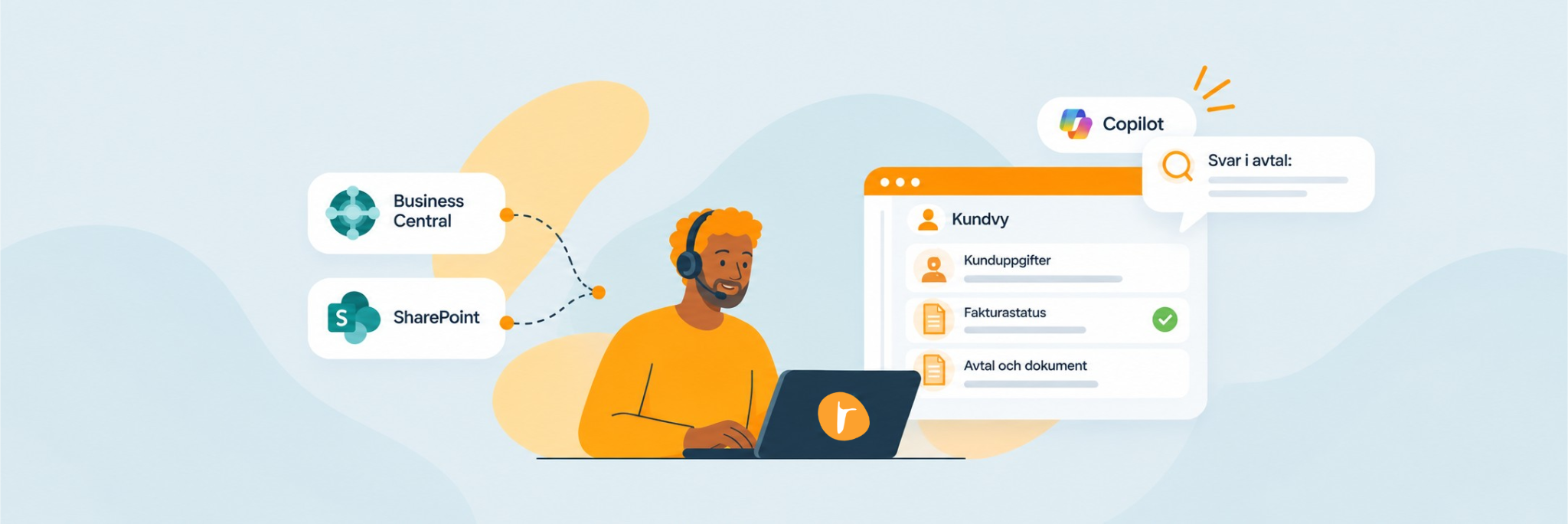
Less time spent searching for information—here’s how to save at least three minutes per task!
Make customer information, invoice status, and answers in contracts and documents available directly within the customer service workflow. Three fewer minutes spent searching per case can free up time for better customer service—and generate significant efficiency gains over the course of a month. Integrate Business Central and SharePoint with Dynamics 365 Customer Service, and let Copilot help employees find answers.
Does this scenario sound familiar to you?
- A customer contacts your customer service department for assistance.
- The employee looks up the customer in the case management system, switches to the business system to check the payment status, and then locates the customer’s contract in a folder on SharePoint. Notes are taken manually.
- It took three minutes to gather information—before the employee had even begun to resolve the customer's issue.
It doesn't have to be that way. By integrating Microsoft Dynamics 365 Customer Service with Business Central and SharePoint, your service organization gains a comprehensive view of the customer—what's known as Customer 360 for service.
Business Case – Calculate Your Time Savings
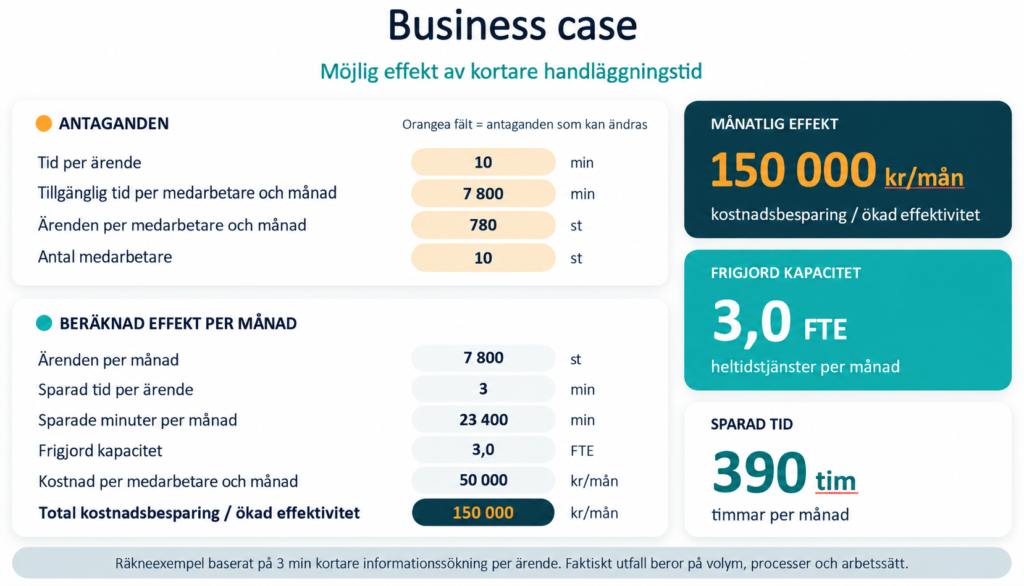
In addition to a significantly better customer experience and higher-quality responses from the customer service department, there are significant efficiency gains to be realized. If each case can be handled three minutes faster with information available immediately, an organization with 10 employees can free up time equivalent to nearly 100 days per month. This corresponds to a capacity of approximately 3 full-time employees, or an efficiency gain of 150,000 Swedish kronor per month.
Create your business case using the following model:
How do we create this enhanced experience and these efficiency gains?
Display relevant information from the business system in the CRM
With just a few values in the interface the customer service representative is working in, a lot happens:
- Is the customer an active, paying customer?
- Are there any overdue invoices?
- Which orders and agreements apply?
Make sure the answer is available directly in the customer view so that the employee can determine whether and how to assist the customer without leaving the case. However, the information is retrieved from, for example, Business Central, Microsoft’s business system.
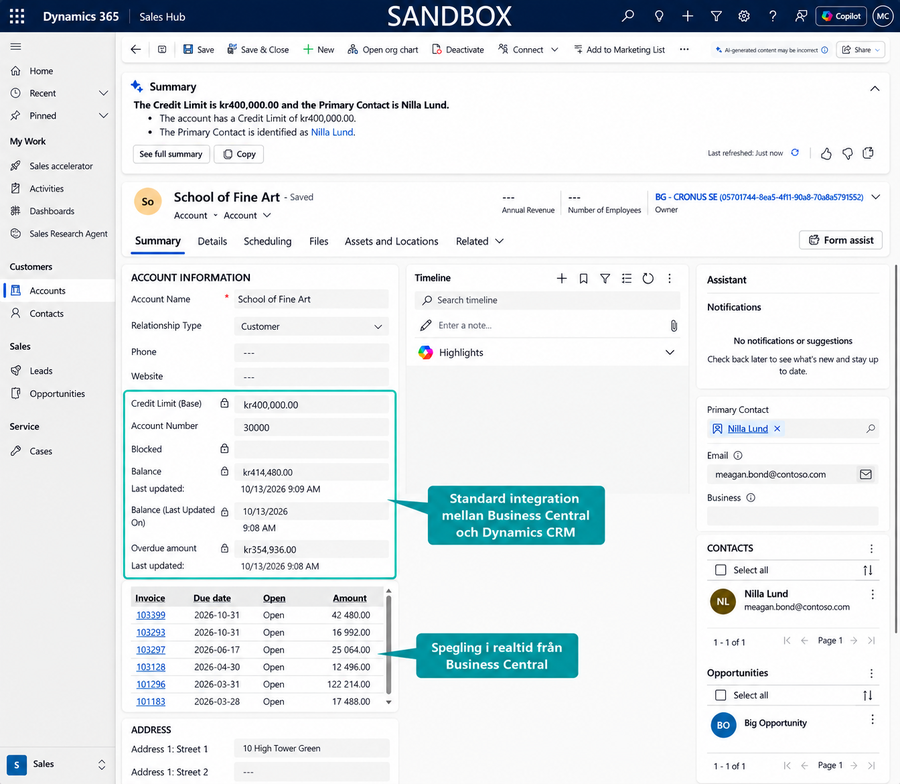
The balance and open invoices from Business Central are reflected in real time on the customer card.
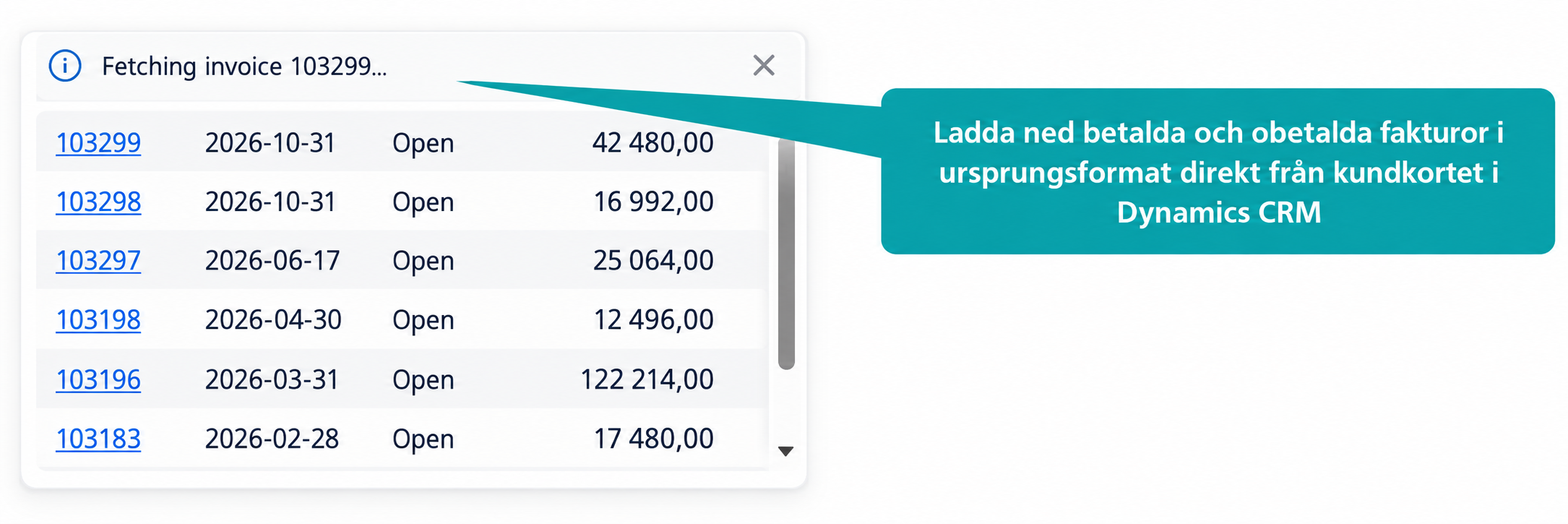
Download paid and unpaid invoices in their original format directly from the customer card.
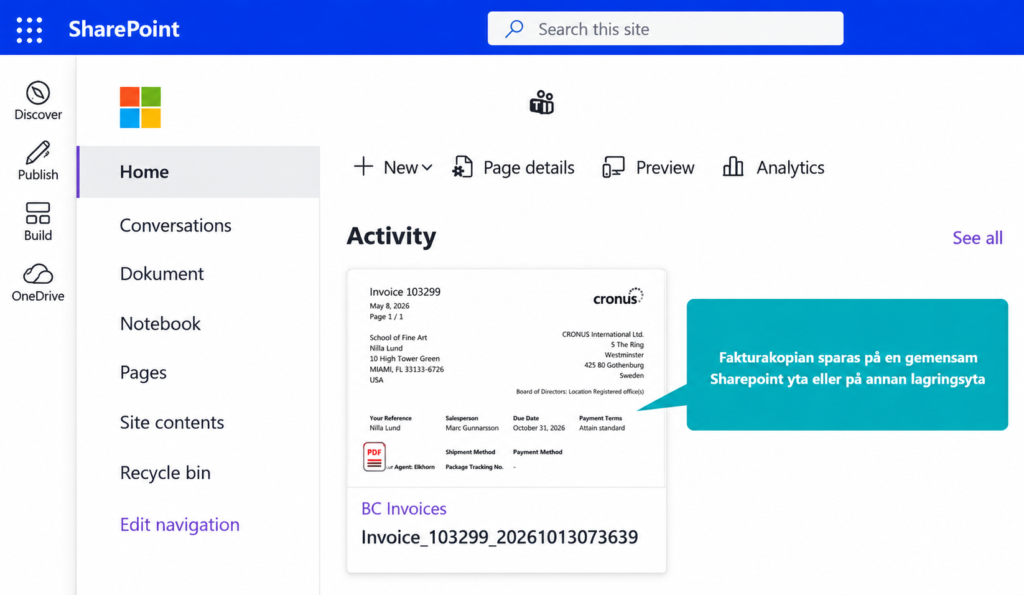
A copy of the invoice is saved in a shared SharePoint site or other storage location.
Start small
We recommend starting with customer names, contact information, customer status, and payment status. This provides immediate benefits for both employees and managers, and you can expand to include order history, deliveries, and service agreements in the next step.
Enable an AI agent in the customer service interface to assist the team
When information is centralized in one place, the built-in AI support in Dynamics becomes significantly more accurate. Service representatives receive answers drawn from contracts and documents, suggestions for next steps, and automatic documentation of the conversation. Customers enjoy better self-service via chat, and complaints can be handled largely automatically.
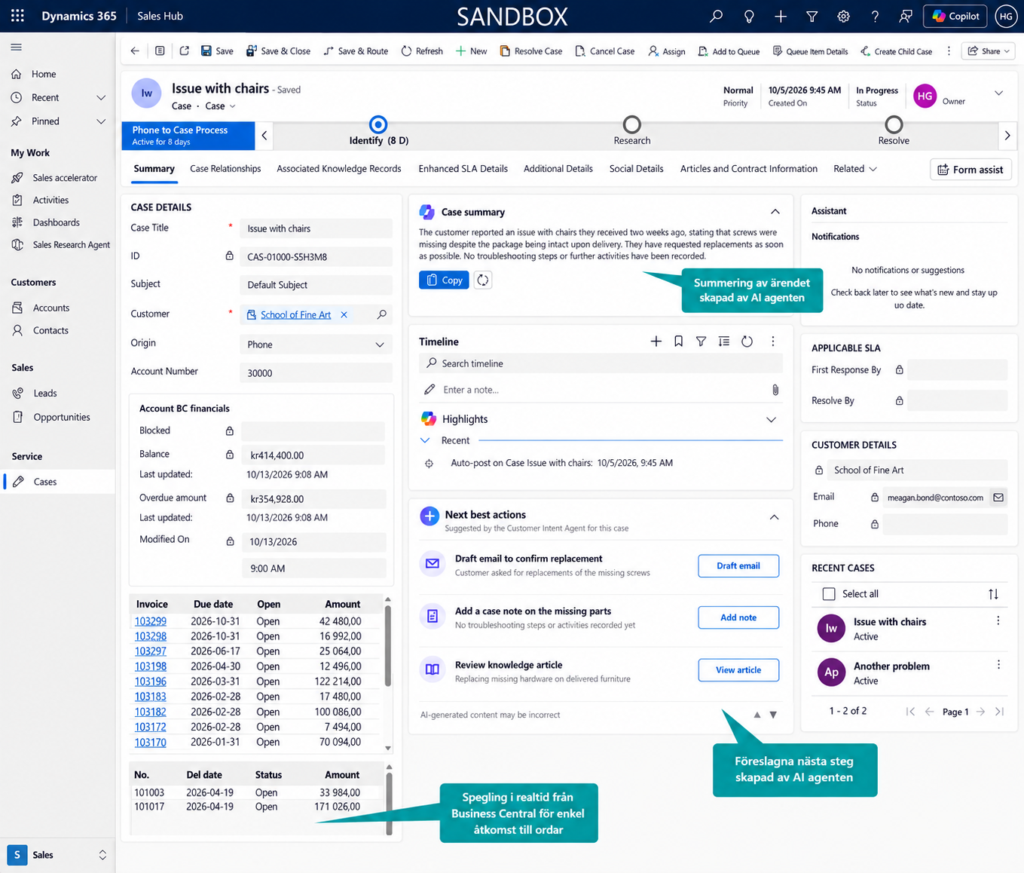
The built-in AI agent summarizes the case and suggests the next steps, with real-time orders from Business Central displayed alongside.
Customer contracts, product information, and terms and conditions are often stored in SharePoint folders. This works well as a document repository, but becomes inefficient when customer service needs to quickly answer a specific question while the customer is waiting.
Instead of requiring employees to manually search the correct folder, open multiple documents, and read through the agreement, Releye can configure an AI-powered knowledge agent via Copilot that makes selected SharePoint documents searchable directly from the customer service interface in Dynamics 365 Customer Service.
The employee can then ask questions, such as:
- When does the customer's contract expire?
- Is this service covered under the customer's contract?
- What are the terms and conditions for termination or renewal?
- Is the customer entitled to support for this product?
- What is the complaint process under the agreement?
The agent searches the documents that the organization has chosen to make available and presents a suggested response—along with a link or reference to the source document. This allows the employee to verify the information before providing a response to the customer.
For recurring and business-critical information—such as the contract’s expiration date, contract status, and which services are included—this data should also be made available as clear fields in the customer view when appropriate. This allows employees to see the most important information immediately, while the knowledge agent is used to explain details, terms, and exceptions in the documents.
This reduces the time spent searching for information and makes it easier to provide a consistent response—without the customer service representative having to switch between Dynamics, SharePoint, and other systems.
Important: The agent should only have access to approved documents and must follow the organization’s access control model. Contracts and other client-specific documents must therefore be structured and restricted so that an employee can only find information that they are authorized to view.
Develop Workflows – See the Results in Power BI
Which customers generate the most service requests, and what does it cost? With aggregated data, you can track everything from handling times to how service requests are distributed by customer, contract, or product. This allows you to set the right priorities and demonstrate the value of your service organization.
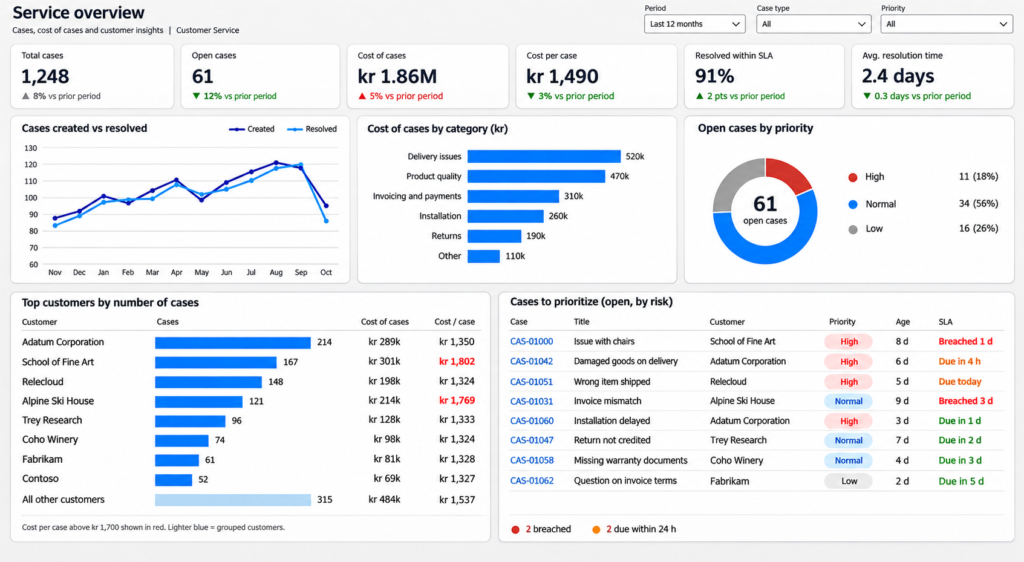
Example of a Power BI dashboard for service managers.
Builds on what you already have
For organizations that already use Business Central, certain existing users can gain access to Dynamics 365 Customer Service through what are known as “attach licenses.” These cost significantly less than a standalone base license and make it easier to work across system boundaries.
The goal is for each user to work in the system where they spend the most time. The Finance department primarily works in Business Central, while Customer Service works in CRM. Once the systems are integrated, Customer Service will be able to view all relevant customer information—such as contact information, invoice status, order history, and other relevant details—directly in CRM.
For users who primarily need analytics and insights, more limited licensing options may be appropriate. At the same time, we’re seeing how Copilot enables more people in the organization to retrieve information and analytical data by asking questions to an agent in a chat instead of working directly in the systems. This places greater demands on consolidating data from ERP, CRM, and other business systems into a shared information hub where the information is structured and accessible. Whether you use Microsoft for both ERP and CRM, or combine several different systems, the ability to collect and make data accessible is becoming an increasingly important part of your organization’s customer and service processes—and it is what will determine whether your organization is AI-ready for the future.
Therefore, the best time to determine licensing requirements is after roles and processes have been mapped out.
Would you like to see what it might look like at your place?
We'll help you find the right solution to streamline your processes and create a smoother integration between finance and customer management.
Tell us briefly about your challenges and what you want to achieve, and we'll help you explore the possibilities.
Contact us today
Email us at info@releye.se

Article written by
Go Ghoulami!
Team Manager & Solutions Architect