

Use the latest Dynamics updates to streamline your sales

Join us for a quick story about a pretty typical day at the office;
In a busy sales department, colleagues spend hours organizing their customer data. Henrik, an experienced salesperson, frantically searches for information about prospects in his former colleagues’ notes. His frustration grows when he thinks about the countless hours he has wasted sifting through files and emails.
Hanna, a sales manager, struggles to prioritize leads and sales opportunities. She often feels overwhelmed and isn’t always able to provide her team with the guidance they need. Peter, the CRM administrator, struggles to keep the CRM system up to date; duplicates, missing information, and outdated sales opportunities hinder his efforts to streamline the sales process.
The challenges are clear: wasted time, missed opportunities, and customer frustration. Sales professionals like Henrik, managers like Hanna, and administrators like Peter struggle to deliver top-notch customer service and meet their sales targets.
Does this sound familiar? These are just a few examples we at Releye have heard time and again from sales departments. Microsoft Dynamics now simplifies the work of sales reps, sales managers, and CRM administrators with its new features and AI Co-Pilot. In the latest version, we highlight a few key features that will be particularly important for those of you using CRM in Microsoft Dynamics 365 Sales and help you navigate the following issues:
- How can you provide better customer service?
- How can you save time and close more deals?
Let’s take a closer look at some of the new updates that are starting to roll out this October:
1. AI-generated business summaries – A knowledge buddy
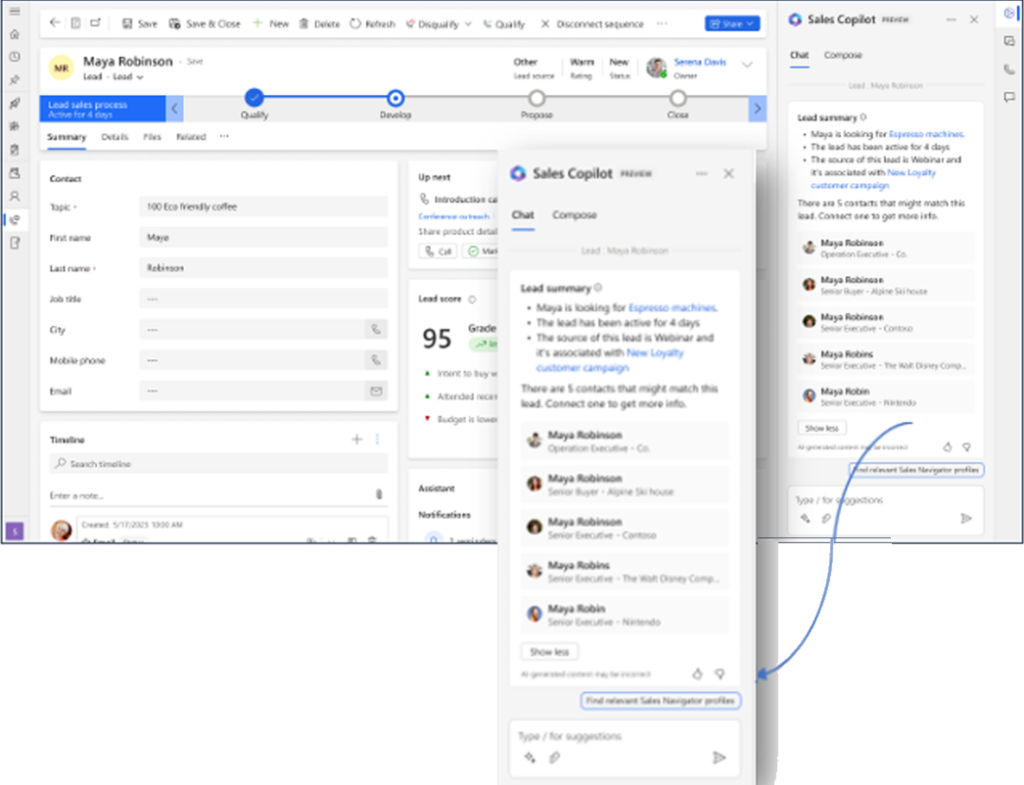
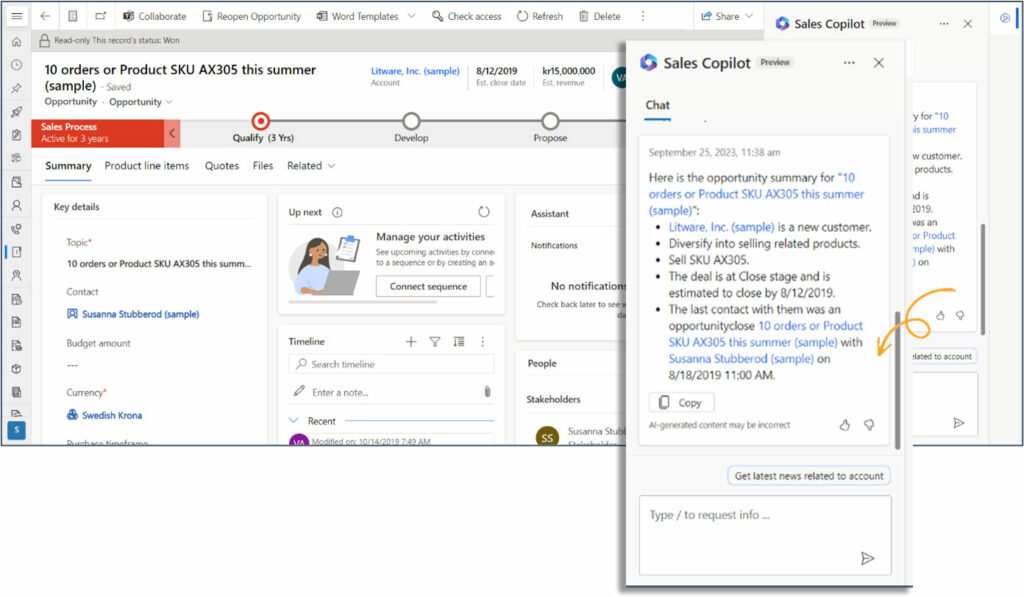
Dynamics 365 Sales introduces an AI-powered assistant. It streamlines your lead management and open opportunities by aggregating data from CRM, the web, or LinkedIn.
The AI assistant will provide a more user-friendly overview and keep track of important changes right in the Co-pilot pane. Thanks to faster and more accessible information, you can qualify or disqualify your deals more easily. In addition, you’ll receive instant updates on specific deals, making it easier to focus on the most promising opportunities, manage more deals, and stay better informed about the business landscape.
2. Streamline preparations for client meetings using AI-generated notes
This feature gives you control over what’s happening and lets you know when to take action. To attract and retain satisfied customers, it’s essential to work proactively with them and keep track of past and upcoming activities. This feature will handle that for you. Among other things, it helps you prepare for meetings and assists you with:
- Get a summary of your most recent interactions with your contact, including notes, emails, and previous meeting summaries
- Search for the latest and most relevant news about your customer
- Search the system for relevant information, such as similar opportunities
- Get a summary of your important documents
3. Modern user experience – sleek and efficient
Dynamics now features a modern and more user-friendly interface.
Exciting features related to your business opportunities that will soonrmore winter 23/24:
1. Prioritize Like a Pro – Business Rules to Help You Act on Leads and Opportunities Quickly
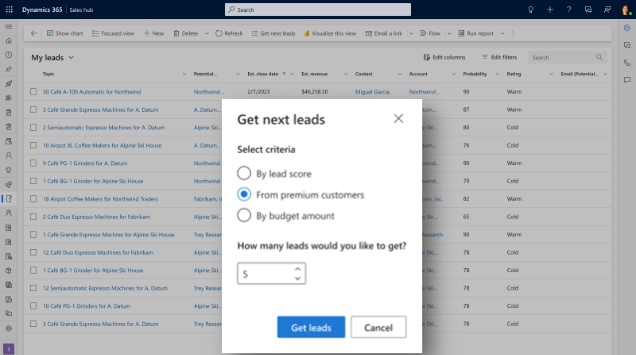
After November, you can create rules that prioritize leads and sales opportunities, helping sales reps focus on the most important ones. For sales managers , you’ll be able to set assignment rules to distribute leads to salespeople and help reprioritize these potential customers. As a salesperson will be able to request a specific number of business opportunities, and using the established rules, the system will prioritize them for you.
2. Automated rules and notifications when assigning sales opportunities and leads.
When new leads and sales opportunities are automatically assigned to you as a sales representative, you’ll receive a notification. This means that sales representatives can receive immediate notifications in the CRM system as soon as a lead or sales opportunity is assigned to them via the automatic rules. You’ll also be able to set up rules to send emails to colleagues when this happens, or receive regular notifications about assignment issues. This means your prospects will keep you top of mind when you act quickly and accurately.
3. Make sure every deal has an owner and minimize forgotten deals
Responding quickly to leads is important to show customers that you’re available and to prevent competitors from getting ahead of you. Providing excellent customer service is what will ultimately keep customers coming back to you as their supplier.
This section builds on the previous steps regarding lead assignment rules. With this feature, you—as an administrator or sales manager—will be able to review statistics and data, thereby identifying bottlenecks, troubleshooting issues, and improving the automation of leads and sales opportunities.
4. Sales Copilot: Outlookkoppling + leadobjekt = sant <3
Previously, using the Outlook add-in, you were able to link emails to existing contacts in the CRM. Now, with Sales CoPilot (formerly Viva Sales), you can finally easily match emails to lead objects. With Sales CoPilot, you can now match emails, schedule meetings, create new leads, make changes, and more.
So, how can you use AI to provide better customer service?
How can you save time with your CRM and increase the number of deals closed?
At Releye, we believe you’ll be able to provide better customer service and win more business by first ensuring you have a firm grasp of your deals so that nothing falls through the cracks. Have you done what you need to do with your open sales opportunities? This means planning activities for each customer and qualifying the right deals based on your sales process, while closing or abandoning those that will take more time than they’re worth.
We encourage you to try it out and stay tuned for upcoming updates. Encourage curiosity and discussions with colleagues to explore how you can all benefit from this together. Using these features early on will make your data easier to use. It saves time and helps you improve customer service by providing you with better information about your customers. This way, you increase customer satisfaction and win more business.
All in all – What do you think will happen when Henrik, Hanna, and Peter start using these new AI-powered and other efficiency-boosting features? How will their work lives change, and how will their sales results be affected?
Want to learn more? Fill out the form with your contact information and we'll get in touch!
Contact us today
Email us at info@releye.se